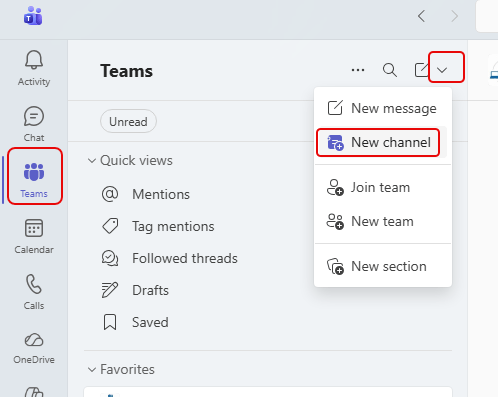
When you’re trying to add a new channel into a Teams workspace, it can be a bit confusing to find the options if you don’t do it regularly. If you add channels this way, it’s WAY too easy. 🙂 Here’s how it works…
Learning new Microsoft Office tricks in "just a minute"
When you’re trying to add a new channel into a Teams workspace, it can be a bit confusing to find the options if you don’t do it regularly. If you add channels this way, it’s WAY too easy. 🙂 Here’s how it works…

This feature has been around for a long time, but I don’t see it used or talked about very often. Did you know you can pin up to three files/folders to the top of a view in a SharePoint document library? If not, here’s how it works and what it looks like…

Episode 280 of the Microsoft 365 Pulse Roadmap webcast is now out on YouTube. Join Tamara Bredemus and Thomas Duff as we cover this week’s updates.
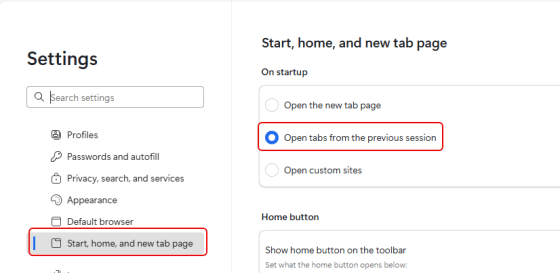
Have you ever had your browser open with all the tabs you’re using on a project, and you inadvertently close the browser (and you lose all your open tabs)? A colleague of mine had that happen today, and I asked if they had the browser set to open with the tabs that were open when the browser was closed. Since they didn’t know about that setting, I figured I’d share that setting with you in Edge, Chrome, and Firebox…

Episode 279 of the Microsoft 365 Pulse Roadmap webcast is now out on YouTube. Join Tamara Bredemus and Thomas Duff as we cover this week’s updates.
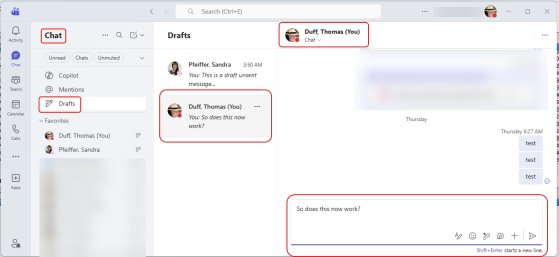
Admit it… this has happened to you more than once… You’re responding to a chat message or a channel post in Microsoft Teams, and before you hit enter to send your message… SQUIRREL! And do you remember to go back and send it? (no) And do you wonder why no one responded to you? (yes). Now with the Drafts Quick View, you can find all those partially completed Draft messages than never got sent! Here’s how that works…
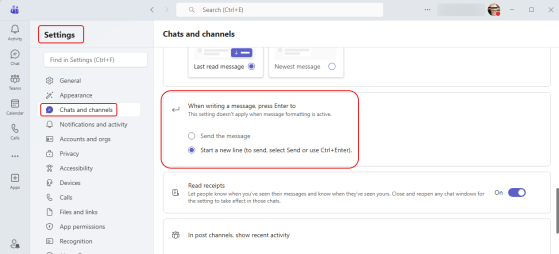
This is a change I’ve been waiting for… for a VERY long time! Have you been in a Teams chat, started typing something, and inadvertently hit the Enter key? And of course, off goes the partial chat and you have to quickly fill in the rest of it. Now, you have a chance to update you settings to determine what the Enter key does when it comes to Teams chat messages. Here’s how that works…
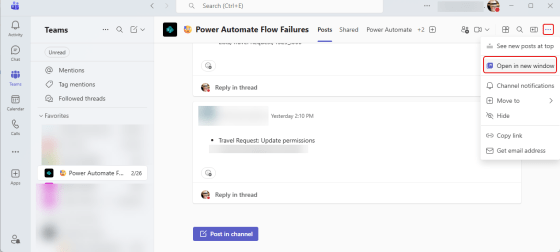
Have you ever had a Microsoft Teams channel that is VERY active, and it’s hard to keep up with what’s going on without a lot of clicking back and forth? Now, Microsoft is allowing you to open a channel into a separate window! Here’s how that works…
 One Minute Office Magic