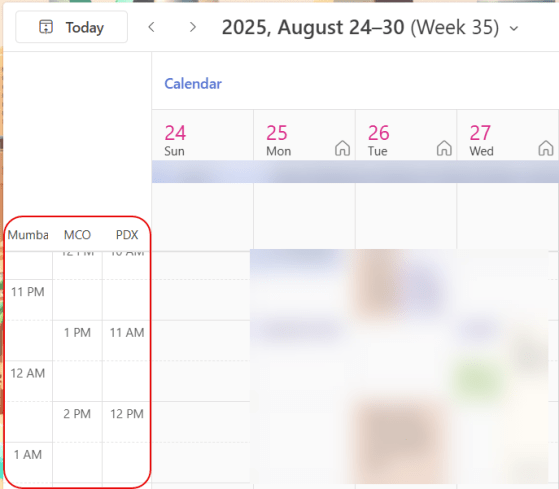
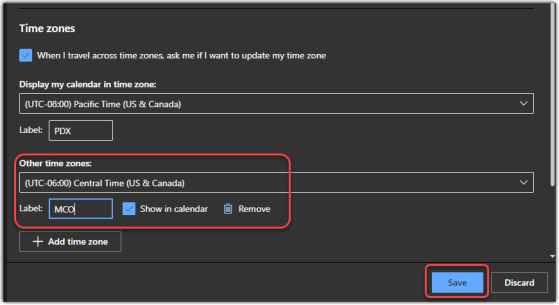
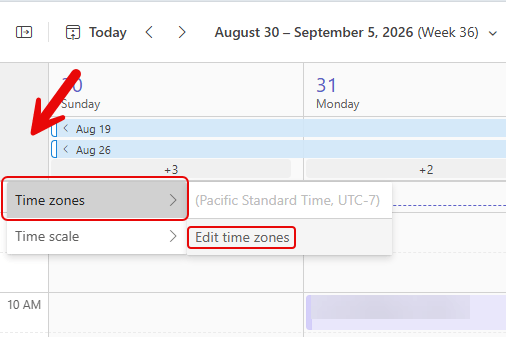
Once of my colleagues pinged me today and asked if I could do a tip on how to set time zones in a Teams calendar. I’ve covered it a couple of times for Outlook, but the time zone settings for the Microsoft Teams calendar are separate from the Outlook settings. So… here’s how you add additional time zones in the Teams calendar…
Tag: Time Zones
Time zones in Outlook calendars (revisited)
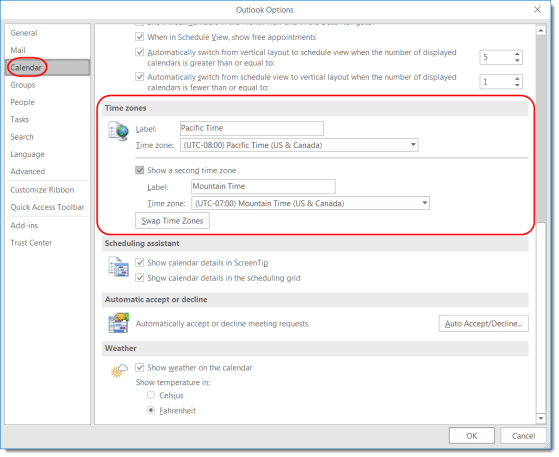
I did a tip on time zones in Outlook calendars back in 2022 when the feature first came out, but I wanted to revisit it given how certain work environments have changed. When you’re using the Outlook calendar (in the browser, New Outlook, or classic Outlook), you can show multiple time zones to the left of the time slots. While it’s easy to make one- or two-hour time zone shifts in your head, it’s a lot harder if your team is off-shore and scattered in different countries. Using this feature can be a lifesaver when it comes to knowing if and when to schedule a meeting for a certain time. Here’s how that works…
Meeting participants time-zone notifications
If your organization is spread out over multiple time zones, it can be hard to set up a meeting if you’re not aware of what time it might be for a particular group of people. Maybe a 4 pm meeting is good for you on the west coast of the US, but it would be 7 pm for those on the east coast. Now, if you’re using Outlook on the browser, you can see the attendee time zones when using the Scheduling Assistant. Here’s what that looks like…
Adding time zones to your Outlook calendar on the web
My colleague Sandra got a nice surprise today… she got a pop-up in her web-based Outlook calendar that pointed her to a new feature… adding time zones! This is a really cool feature for those of us who work and live in more than one time zone. Here’s how it works…
Showing two time zones in Outlook
This feature can make it easier to answer the question “what time is it there?”