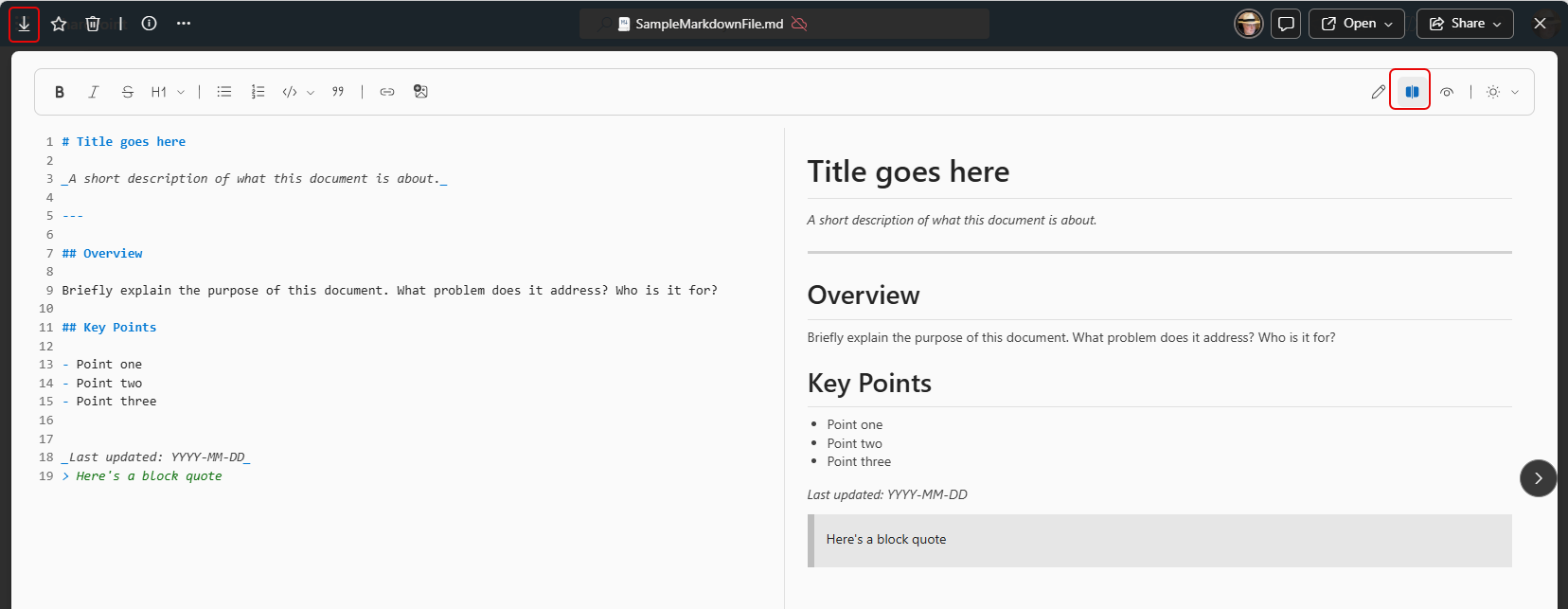
If you are getting immersed in Copilot agents (or system documentation), you are likely seeing more files that end in .md. This is the file extension for markdown files, which are text files that have content and formatting, much like you would see in an HTML file. Markdown files are used extensively in Copilot agents. While you can memorize the formatting of markdown, it’s a lot easier to be able to make changes to a markdown file and see how it will appear when displayed with the formatting. You can now do that with a side-by-side editor for markdown files stored in SharePoint and OneDrive. Here’s what it looks like…
In this example, I have a markdown file named SampleMarkdownFile.md stored in a SharePoint document library. On the left side of the split screen, you see the markdown along with a editing bar that makes it easy to add elements such as headers, bolding, bullet lists, and so forth. On the right side of the split screen, you see what it looks like when it’s interpreted by the browser.
If it’s stored in SharePoint or OneDrive, it will update automatically as you make changes. If you want to download the file to use somewhere else, you can click the download arrow on the left side of the header bar. If you lose the split screen layout, click the split screen on the right side of the page:
This tip definitely isn’t a lesson on how to use markdown language… it’s just a heads-up that you have a decent editing tool built into SharePoint and OneDrive. If you want to start diving into markdown, you might want to check out the Markdown Guide website.


