Creating columns in a Word document

Normally I’m content using a Word layout that stretches from the left to the right margins. But there are times when I’d like to have a layout that looks more like a newspaper or magazine, where there are two or three columns running down the page.

Well, you can do that in Word…
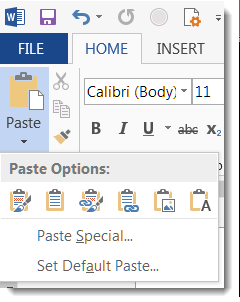
Various Copy/Paste options between Excel and Word

On more than one occasion, I’ve been in the position of having some data stashed in an Excel spreadsheet, but I need to have it be part of a Word document. I could give my audience two files to see everything, but I really want to have everything in a single Word document… What to do?

Instead of just copying and pasting some cells from Excel into Word, I can use the Paste button dropdown to get some interesting options on how the data will show up in Word.

Selecting text in Word

I tend to do a lot of clicking and dragging the cursor to select text in Word. But these two tips are very useful for saving time and effort when it comes to grabbing sentences and paragraphs.

The Properties Pane is back in Office ProPlus

When we first started upgrading to Office ProPlus (aka Office 2016), we were excited and happy… until someone noticed that the Properties Pane for things like Word, Excel, and PowerPoint documents was no longer visible. Needless to say, this made some of our customers “not very happy”.

Somewhere along the way, Microsoft fixed that problem in the Office clients, and now you can once again see and access the properties. Here’s how you do it…

Using AutoText in Word Quick Parts

When you’re in Word, you often have to use certain blocks of text in many different documents. Instead of typing the same content over and over (or using copy and paste from something like Notepad), check out the Quick Parts AutoText feature instead…

Making the Word calculator a bit more useful

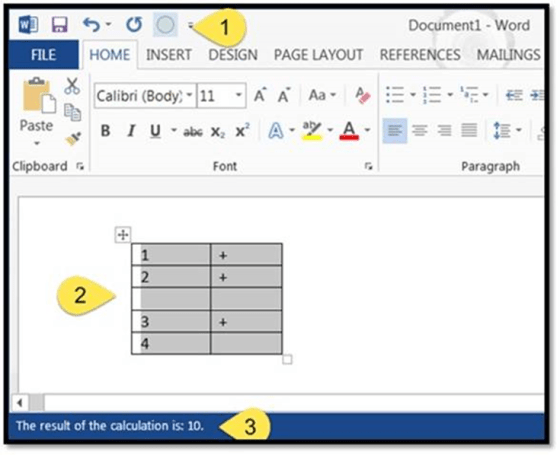
A colleague sent me an email after last week’s tip on creating a calculator in Word. She wondered if you could create a “spreadsheet” of claims in Word, and use the calculator to add up the claim totals. Much to my surprise, you *can* do something like what she suggested.

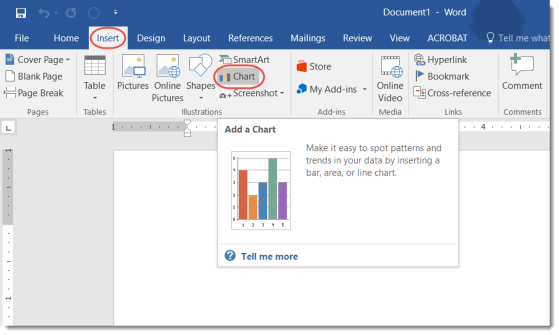
Quick charting from within Word

Normally if I have a chart that I want to add to a Word document, I create it in Excel and then copy and paste it over. However, Word has a decent charting function that makes it pretty easy to add basic charting on the fly.