Here’s a feature in Excel that I never noticed before… like *that’s* a surprise! 🙂 If you need to add a screenshot in an Excel spreadsheet (perhaps for documentation), you can use the Screenshot feature that’s built into Excel… and you can manipulate the image once it’s out there! Here’s how you do that…
Tag: Excel
Changing an Excel column of text numbers to actual numbers in a couple of clicks
I have a bit of a love-hate relationship with Excel. I know it’s very powerful, but I really don’t know how to use it beyond the very basics. Today was one of those instances where I had a column of “numbers” in a spreadsheet that I wanted to sort, but Excel thought they were text strings. I wasn’t sure how to get Excel to truly treat them as numbers until I found this cool trick…
Excel navigation using the CTRL and arrow keys
Using the keyboard arrow keys in conjunction with the Control (CTRL) key moves you to the top, bottom, front, and back of the column and rows that you’re in. But of course, I always forget that, so I’m putting this tip out there to remind me…
Making your voice heard at Microsoft – UserVoice sites for our relevant software
Hardly a day goes by that we don’t get a question from someone along the lines of “does do , and why doesn’t it?”. Or, there’s the “when will Microsoft change to allow us to do ” question. Bottom line… we don’t know, and we have virtually no sway to influence Microsoft to change their software… but you do!
Excel Flash Fill on names
I’m sitting in a training session today, and I saw the trainer do something in Excel that I didn’t know was possible… Flash Fill can complete columns of names based on other columns. Here’s how…
Inserting multiple blank lines in an Excel spreadsheet
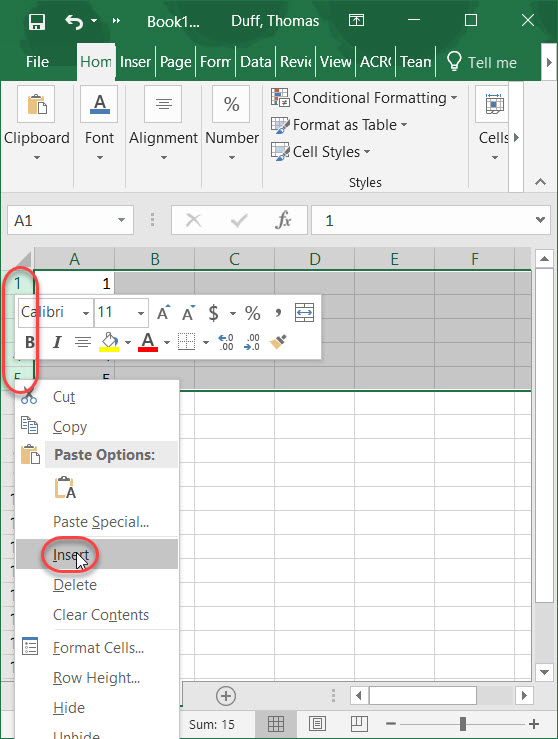
This is a really simple tip that I wish I had known about sooner, instead of copy and pasting blank rows for an Excel spreadsheet. Instead of just inserting a single blank row, you can easily insert multiple blank rows by highlighting the number of rows you need. Here’s how…
Excel keyboard shortcuts
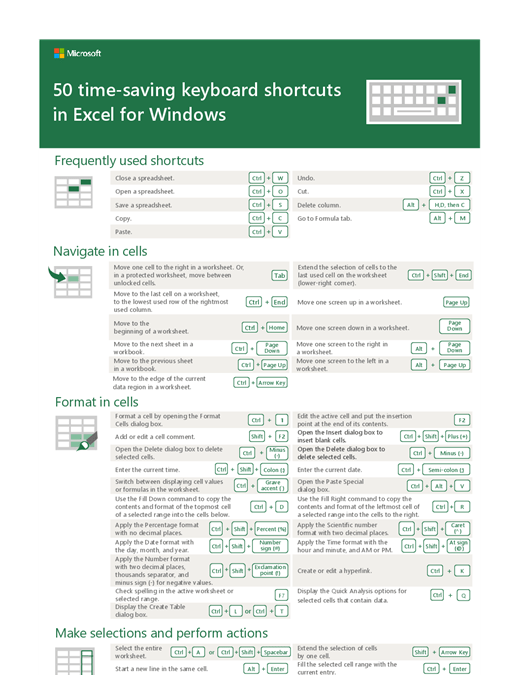
Are you the type of person who likes to use keyboard shortcuts when you’re working with software? If you do, here’s a great resource for keyboard shortcuts in Excel.
What in the world is an “Interrobang”?
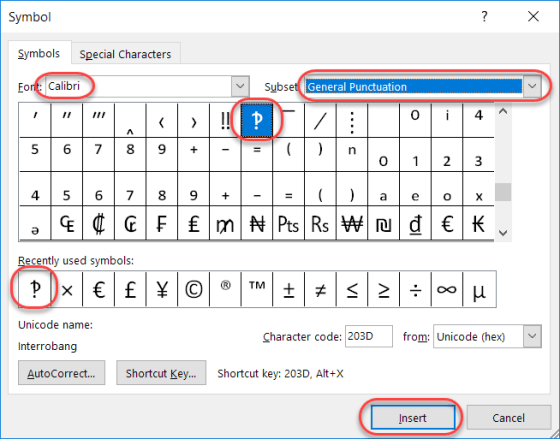
Today’s tip is a bit lighter in nature, as I learned something this week which I had never even heard, much less knew about. Have you ever written an email or a Skype message that was something along the lines of “What do you think you are doing?!?!?!” That series of snarky question marks and exclamation points, when combined, are often referred to as interrobangs.
Setting the Print Area on an Excel spreadsheet
Obviously, you can have a multitude of rows and columns in an Excel spreadsheet spread out over numerous worksheets. However, if you want to print out just part of the information, you may think you have to print out everything just to get the part you want. In reality, you can set the Print Area of your spreadsheet to only print out the area that you need, saving paper and time in the process. Here’s how you do that…