Skip to content

One Minute Office Magic

  • Facebook
  • LinkedIn
  • Twitter
  • Instagram

Learning new Microsoft Office tricks in "just a minute"

  • Home
  • About
  • Contact

Category: Outlook

Show In Groups in your Outlook Inbox

Show In Groups can help you visually organize your Inbox.

Outlook, Show In Groups

Dragging and dropping attachments to an Outlook email

There are different ways to add and save attachments in Outlook.
Outlook

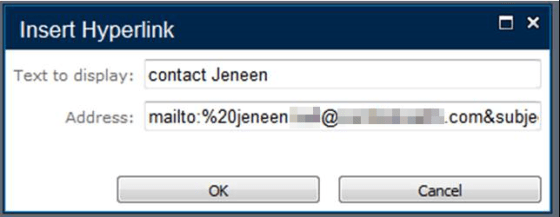
How to create a hyperlink that will open a new pre-populated email

This is a great way to pre-format an email for people.
Excel, mailto, OneNote, Outlook, PowerPoint, SharePoint, Word

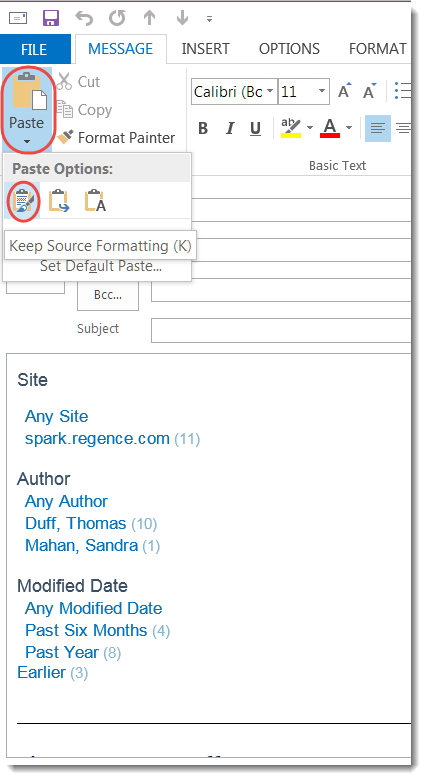
Paste options in Microsoft Office

Try these various Paste options next time you have to copy into another document.

Excel, OneNote, Outlook, Paste Options, PowerPoint, Word

Editing an email to add your own notes

Here’s how to add information to an email without having to resend it to yourself.

Change up your email view columns in Outlook

You have a number of options when it comes to columns in Outlook

Outlook

Cleaning up your Outlook Auto-Complete list

Cleaning up your Outlook Auto-Complete list is easier than you think.

Auto-Complete, Outlook

The Outlook photo… more than just a pretty picture!

The picture you see in Outlook does more than you think.

Outlook

Attachments vs. embedded files in Outlook

This is why you sometimes see file attachments in the body of your email.

Attachments, Embedded Files, Outlook

Posts navigation

Older posts
Newer posts

Search

Text Widget

This is a text widget, which allows you to add text or HTML to your sidebar. You can use them to display text, links, images, HTML, or a combination of these. Edit them in the Widget section of the Customizer.
Blog at WordPress.com.
  • Subscribe Subscribed
    One Minute Office Magic
    Join 81 other subscribers

    Have a WordPress.com account? Log in now.

  • One Minute Office Magic
    View site in Reader
    Manage subscriptionsSign upLog in
    Report this content
    Collapse this bar
Loading Comments...