Have you ever been asked, “What days and times are you free to meet this week?” Rather than jotting down all the dates and times manually, there’s a quicker way to provide the information.

Learning new Microsoft Office tricks in "just a minute"
Have you ever been asked, “What days and times are you free to meet this week?” Rather than jotting down all the dates and times manually, there’s a quicker way to provide the information.
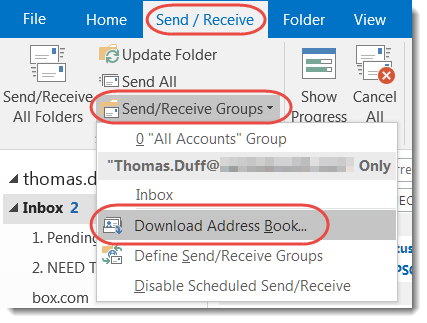
Earlier this week, I was getting bounced mail to a person who I knew was still with the company, and it was part of a Reply To email. I couldn’t figure out why, until our mail administrator asked me to update my cached Outlook address book from the Global Address Book in Exchange. Here’s how that works…

I’m sure you’ve had the issue before… you have a number of emails related to a particular thread, but one of them had a piece of information that didn’t get copy and pasted in the Reply follow-ups. You’ve filed some of the emails, trashed others, and the rest are in your inbox…

How to save a calendar entry in an iCalendar (.ics) format.

Skype for Business allows you to be very detailed in terms of when your work phone calls are forwarded.
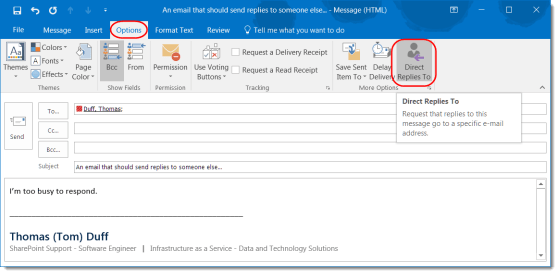
This is a great feature if someone else should be handling responses to a particular email.
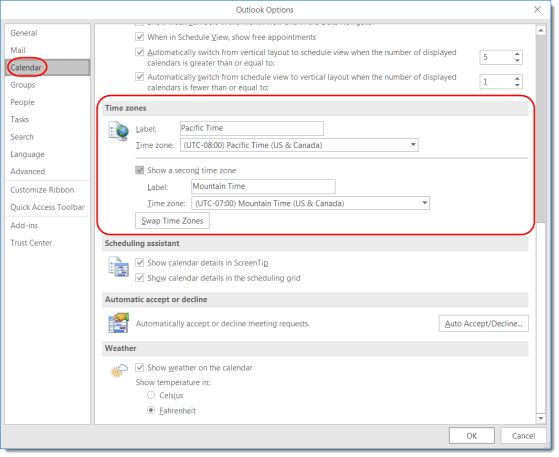
This feature can make it easier to answer the question “what time is it there?”

Making your Skype for Business links clickable in your Outlook emails.

Use Advanced Find to narrow down your search results in Outlook.

