Episode 161 of the Microsoft 365 Pulse Roadmap webcast is now out on YouTube. Join Tamara Bredemus and myself as we cover this week’s updates.

Learning new Microsoft Office tricks in "just a minute"
Episode 161 of the Microsoft 365 Pulse Roadmap webcast is now out on YouTube. Join Tamara Bredemus and myself as we cover this week’s updates.

Trying to find common meeting times when scheduling a meeting with a lot of people can be a hassle, with calls going back and forth between potential attendees. You can make it easier by allowing people to vote for selected times using the Scheduling Poll option. Here’s how it works…

Episode 160 of the Microsoft 365 Pulse Roadmap webcast is now out on YouTube. Join Jennifer Mason, Tamara Bredemus, Adam Ochs, and myself as we cover this week’s updates.
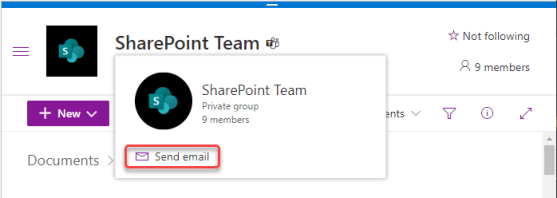
Sandra made a *huge* discovery the other day when it comes to trying to email all the people who are part of a Microsoft Teams workspace. Up until now, we’ve been recommending that people use a distribution list and that they manually keep it in sync with the members of the Teams space. Very cumbersome, but we didn’t have a good way around that… until now. Here’s how you can use a single email address to notify everyone in a particular Team, and even invite them to meetings…

Episode 159 of the Microsoft 365 Pulse Roadmap webcast is now out on YouTube. Join Tamara Bredemus and myself as we cover this week’s updates.

One feature that has been missing in Microsoft Whiteboard is a built-in timer function. This is useful for when you’re doing an exercise and you want the participants to know how much time is left. With the latest set of changes to Whiteboard, there is now a built-in timer. Here’s how it works…

Raising your (virtual) hand in a Teams meeting is a great way to let the moderator know that you have a question or comment. However, the button to do a hand raise was sort of buried in the menu and wasn’t very intuitive. Microsoft made some user interface changes, and now there’s a dedicated hand raise button on the meeting bar. Here’s what it looks like…
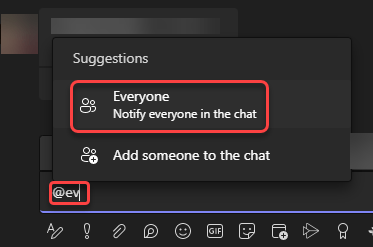
You’ve likely been in a Microsoft Teams group chat where you wanted to make sure everyone in the chat got pinged that there was a message there. However, trying to @ mention everyone individually is a major pain. Now, you can use @Everyone in a Teams group chat will get the notification ping that you sent a message. Here’s how that works…

Episode 158 of the Microsoft 365 Pulse Roadmap webcast is now out on YouTube. Join Jennifer Mason, Tamara Bredemus, and myself as we cover this week’s updates.
 One Minute Office Magic