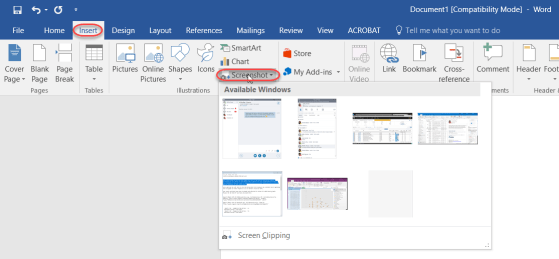
This is an awesomely cool trick I learned from Christian Buckley during our last Office Productivity Tips Grudge Match webinar. This allows you to easily pull a screenshot of an open Window into your Word 2016 document. Here’s how it works…
Learning new Microsoft Office tricks in "just a minute"
This is an awesomely cool trick I learned from Christian Buckley during our last Office Productivity Tips Grudge Match webinar. This allows you to easily pull a screenshot of an open Window into your Word 2016 document. Here’s how it works…
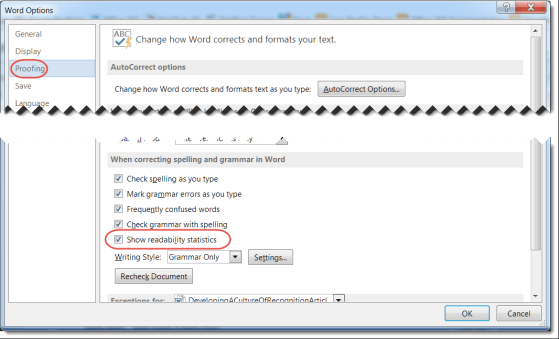
When you create a Word document, there are a number of things to consider. After making sure you don’t have any typos or grammatical errors, you should check to see how easy it is to read and understand. One standard in this area is the Flesch Reading Ease and Flesch-Kincaid Readability Score. Microsoft can provide these statistics for you automatically.

There’s no question that Word, Excel, PowerPoint, and Outlook have a ton of functionality. However, sometimes it’s nearly impossible to remember or find the right menu option to trigger it. In Office 2016, there’s a new feature called Tell me what you want to do. It is a lifesaver in finding what you need to know when you need to know it.

Normally I’m content using a Word layout that stretches from the left to the right margins. But there are times when I’d like to have a layout that looks more like a newspaper or magazine, where there are two or three columns running down the page.
Well, you can do that in Word…
On more than one occasion, I’ve been in the position of having some data stashed in an Excel spreadsheet, but I need to have it be part of a Word document. I could give my audience two files to see everything, but I really want to have everything in a single Word document… What to do?
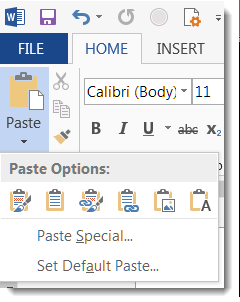
Instead of just copying and pasting some cells from Excel into Word, I can use the Paste button dropdown to get some interesting options on how the data will show up in Word.

I think AutoCorrect in the different Office programs (such as Word, Excel, and PowerPoint) is a lifesaver when it comes to creating documents with no (or fewer) typos.
What you may not know is that you have the ability to do a lot of customization in AutoCorrect in order to make it work best for your particular situations.
I tend to do a lot of clicking and dragging the cursor to select text in Word. But these two tips are very useful for saving time and effort when it comes to grabbing sentences and paragraphs.

So are you tired of the normal color background and theme of your Office apps, such as Outlook, Word, Excel, PowerPoint, and OneNote? Well, you can change them, and here’s how you do it.

When we first started upgrading to Office ProPlus (aka Office 2016), we were excited and happy… until someone noticed that the Properties Pane for things like Word, Excel, and PowerPoint documents was no longer visible. Needless to say, this made some of our customers “not very happy”.
Somewhere along the way, Microsoft fixed that problem in the Office clients, and now you can once again see and access the properties. Here’s how you do it…

