Adding Page Breaks to your Word document

We’ve all been there… you have a Word document where the last few lines of a paragraph spill over to a new page, and you would rather have it all together. Rather than try and manually move the paragraph down to the new page with line breaks, it’s better to use the Page Break feature in Word to do that!

Finding folder names in Outlook search

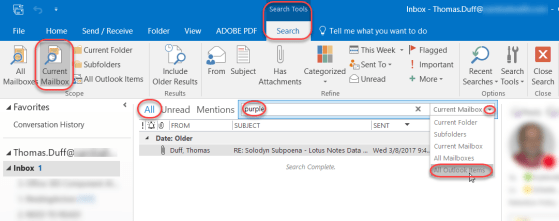
This tip came to me via Sandra in the typical fashion… a Skype ping that starts “I just figured out something cool… wanna see?” She shared her screen and showed me how to search for items in your Outlook mail file and have it show you what folder it’s in! Here’s how it works…

Inserting screenshots in Word

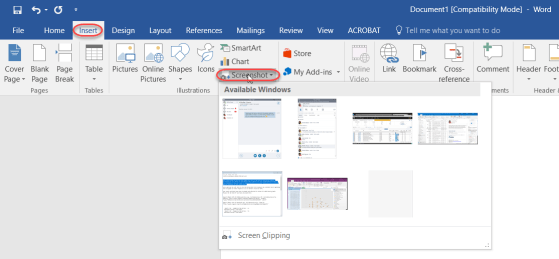
This is an awesomely cool trick I learned from Christian Buckley during our last Office Productivity Tips Grudge Match webinar. This allows you to easily pull a screenshot of an open Window into your Word 2016 document. Here’s how it works…

Checking the readability of your Word documents

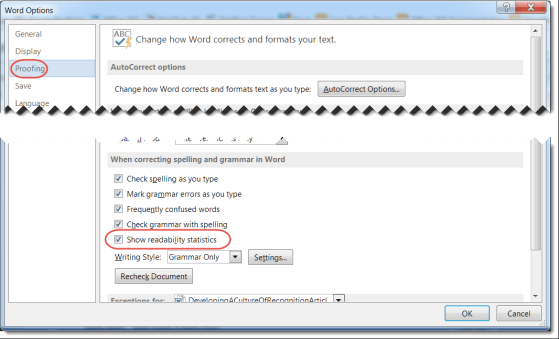
When you create a Word document, there are a number of things to consider. After making sure you don’t have any typos or grammatical errors, you should check to see how easy it is to read and understand. One standard in this area is the Flesch Reading Ease and Flesch-Kincaid Readability Score. Microsoft can provide these statistics for you automatically.

Adding color to your Outlook inbox

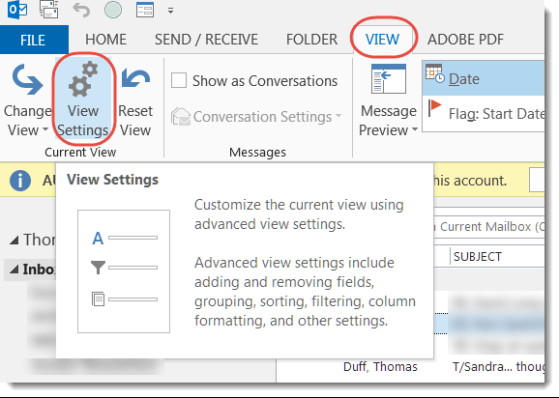
I’ve been asked a number of times, “Hey Tom! Is there a way I can make my inbox show emails from my boss in a different color?” To date, my answer was always an apologetic “no”. But a colleague recently sent me a screen print of her inbox doing just that, so I had to figure out how she made that happen… and I found it!

Creating columns in a Word document

Normally I’m content using a Word layout that stretches from the left to the right margins. But there are times when I’d like to have a layout that looks more like a newspaper or magazine, where there are two or three columns running down the page.

Well, you can do that in Word…