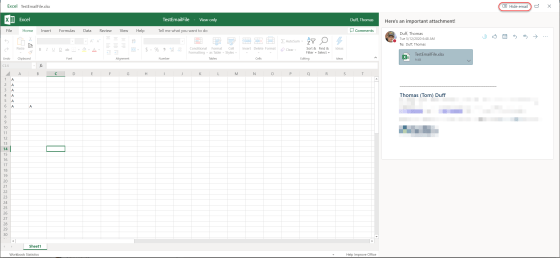
As I get older, I find that my mind is much more… “efficient” when it comes to “erasing” short-term memory… such as “why did I have this particular email open on my screen, and did I already respond to it?” Well, I just saw an option in Outlook that closes the original email when you do a Reply or Forward, eliminating all the screen clutter. Here’s how it works…
I love tech conferences… and the SharePoint Conference in Las Vegas rocks!
I’ve always been an addict when it comes to large tech conferences, as I learn lots and get to mix…
Want more tips in a fun, live environment? Come to SharePoint Conference!
Can’t wait to present at my first SharePoint Conference May 21-23, 2019. Register with this link and get $50 off…
Changing an Excel column of text numbers to actual numbers in a couple of clicks
I have a bit of a love-hate relationship with Excel. I know it’s very powerful, but I really don’t know how to use it beyond the very basics. Today was one of those instances where I had a column of “numbers” in a spreadsheet that I wanted to sort, but Excel thought they were text strings. I wasn’t sure how to get Excel to truly treat them as numbers until I found this cool trick…
Finding out what Outlook distribution lists you own or belong to
One of the questions I get asked on a fairly regular basis is how someone can tell what distribution groups they either own or are a member of. In the process of looking up some other information today, I found an option in Outlook Online that provides that information in an easy to read format. Here’s how to find it…
Using the Organization Chart in Microsoft Teams
It’s a pretty common thing to run across someone’s name and wonder where they fall into the company organization chart. One way you can figure that out quickly is to use the Organization feature in Microsoft Teams. Here’s how…
Moving files around in Teams and OneDrive (and back again)
If you’re new to Teams or OneDrive, you may think that moving files from one place to another may involve copying it to your computer and then copying it to the target destination. However, both Teams and OneDrive come with options to copy directly from one location to another. Here’s how that works…
Navigating forward and backwards in Teams
Since I’ve started to use Microsoft Teams, I’ve been a bit frustrated when it comes to getting back to the place where I was at when I clicked a different icon or link. However, I completely missed the Forward and Back navigation arrows in the upper left corner of the Teams client. Here’s how they work…
Bookmarking Teams chat and conversation items with the Saved (Bookmark) icon
While Microsoft Teams makes it very easy to have chats and persistent conversations throughout the day, there are times you might want to flag a particular entry in the chat or conversation for follow-up or additional action. You can do that with the Saved, or Bookmark, icon in each chat entry. Here’s how that works…