Episode 257 of the Microsoft 365 Pulse Roadmap webcast is now out on YouTube. Join Tamara Bredemus and Thomas Duff as we cover this week’s updates.

Learning new Microsoft Office tricks in "just a minute"
Episode 257 of the Microsoft 365 Pulse Roadmap webcast is now out on YouTube. Join Tamara Bredemus and Thomas Duff as we cover this week’s updates.

Have you ever had a list, like perhaps a suggestion list, where you’d like to have some easy way for people to vote on which ones they like or give them a 1 through 5 rating? If you’re working with a SharePoint Teams site, you can do that with the Ratings feature! Here’s how that works…

Episode 214 of the Microsoft 365 Pulse Roadmap webcast is now out on YouTube. Join Tamara Bredemus, Adam Ochs, and myself as we cover this week’s updates.

If you’re like me, you may tend to use your Activity Feed in Teams like a To Do list of items you may need to follow up on. Unfortunately, that feed can get pretty cluttered pretty quickly, and it’d be nice to be able to actually remove items that are done or that aren’t relevant to anything you’re doing. Now you can! Here’s how that works…
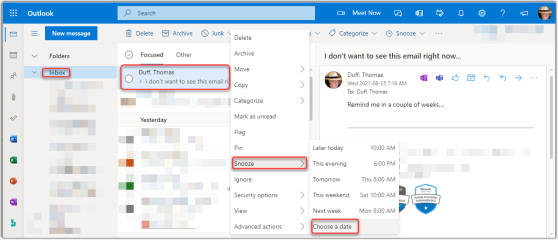
nd to live in my inbox (don’t judge), and it’s a bit irritating when you get an email that you need to act on, but not for a period of time… and it just sits in your inbox until then. Sandra Mahan showed me a better way to deal with that… Snooze! It’s possible to use the Snooze function to set a future date to have the email show back up in your inbox, and you can ignore it until then. Here’s how it works…

If you’re like me, you tend to “bookmark” a lot of things to save for later. Of course, whether you actually get back to reading them is a different matter… The Saved For Later web part is a great way to flag content for later reading, and have it displayed back to you in an easy to read manner. Here’s how it works…

If you have a spreadsheet that has a lot of column filters set, it can be laborious (and probably error-prone) to try and delete all the filters one at a time. But by using the CTRL – SHIFT – L keyboard shortcut, you can turn them all off at once. Here’s an example…

This tip is the result of someone asking me yesterday whether they could edit a transcript once a video had been uploaded to Microsoft Stream. My initial thought was either “no” or “you can upload your own”, but then I hit the interwebs for some research. Much to my surprise, you *can* edit a video transcript, and it’s pretty easy!

If you belong to a number of Microsoft Team workspaces, it can be a little overwhelming to keep track of all the conversations and activities going on in every one of the Teams you are part of. However, you can use the Activity Stream and the associated filter to make it easier to see just the items that are most important to you at that point in time. Here’s how that works…
 One Minute Office Magic