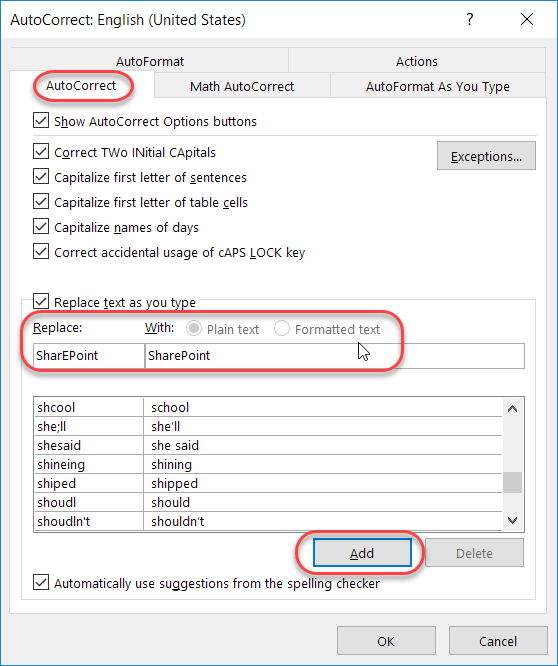
Admit it… you have a few(?) words that you always misspell or mistype when working on a Word document, a PowerPoint deck, an Excel file, a OneNote notebook, or an Outlook email. And, for whatever reason, the program decides that your quirky spelling isn’t important enough to fix for you automagically. Well, you can actually add your own spelling quirks to Office so that you don’t have to wear out the backspace key fixing your errors. And yes… this is a case where you can fix it once, and *all* the programs will pick up the change!
Tag: PowerPoint
The “Tell me what you want to do” feature in Office 2016
There’s no question that Word, Excel, PowerPoint, and Outlook have a ton of functionality. However, sometimes it’s nearly impossible to remember or find the right menu option to trigger it. In Office 2016, there’s a new feature called Tell me what you want to do. It is a lifesaver in finding what you need to know when you need to know it.
Customizing AutoCorrect in Office programs
I think AutoCorrect in the different Office programs (such as Word, Excel, and PowerPoint) is a lifesaver when it comes to creating documents with no (or fewer) typos.
What you may not know is that you have the ability to do a lot of customization in AutoCorrect in order to make it work best for your particular situations.
Morphing slides in PowerPoint
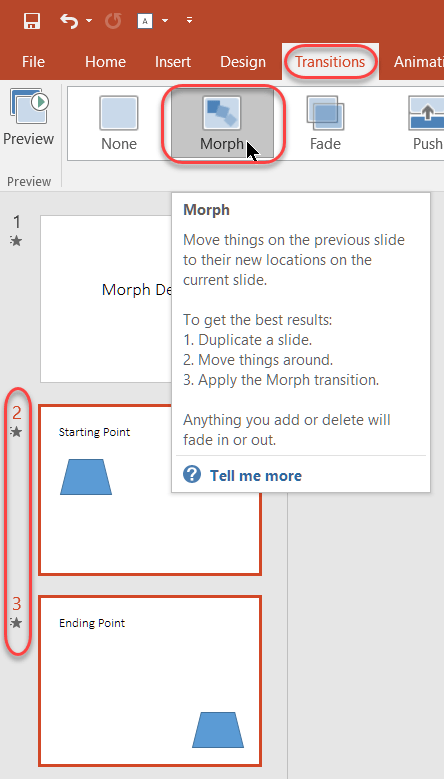
One of the cool newer transition features in PowerPoint is the Morph transition. If you haven’t tried it out, you may want to think about it.
Adding a Youtube video to a PowerPoint presentation
There have been times when I’d like to borrow some content from YouTube to make a point in a presentation… or just to have some opening music before the show starts. This tip shows you how to accomplish that.
Linking to other slides in a PowerPoint presentation
This tip is cool in that it 1) shows me something I didn’t know I could do, and 2) makes me think about different ways I could design a PowerPoint presentation. It’s possible to create hyperlinks in your PowerPoint presentation that point to other slides in the same deck.
Changing the Office Theme colors
So are you tired of the normal color background and theme of your Office apps, such as Outlook, Word, Excel, PowerPoint, and OneNote? Well, you can change them, and here’s how you do it.
Saving all the images in a PowerPoint presentation
Let’s say that you have a PowerPoint PPTX file which has a number of images that you’d like to repurpose for some other reason. Maybe you want them for another presentation, or you want to include them in a SharePoint site or Word document. You could go to each page, right-click on the image, and save it locally… over and over and over.
OR…
You could use this technique to find all the images in one place, and then copy/paste the ones you want to use.
The Properties Pane is back in Office ProPlus
When we first started upgrading to Office ProPlus (aka Office 2016), we were excited and happy… until someone noticed that the Properties Pane for things like Word, Excel, and PowerPoint documents was no longer visible. Needless to say, this made some of our customers “not very happy”.
Somewhere along the way, Microsoft fixed that problem in the Office clients, and now you can once again see and access the properties. Here’s how you do it…