Skip to content

One Minute Office Magic

  • Facebook
  • LinkedIn
  • Twitter
  • Instagram

Learning new Microsoft Office tricks in "just a minute"

  • Home
  • About
  • Contact

Tag: Outlook

How to edit one of your Outlook templates

Here’s how you can edit a custom Outlook template once you’ve created it.

Outlook

Creating Outlook Search Folders

This is a great way to build custom “views” of your email.

Outlook, Search Folders

Date shortcuts in Outlook

You have more options for entering date information than you think.

Date Shortcuts, Outlook

How to recall unread messages in Outlook

This is how you can recall a message that you shouldn’t have sent.

Message Recall, Outlook

Changing an Outlook email from plain text to HTML

Replying to a plain text email can take away all your formatting options. This tip fixes that for you.
Outlook

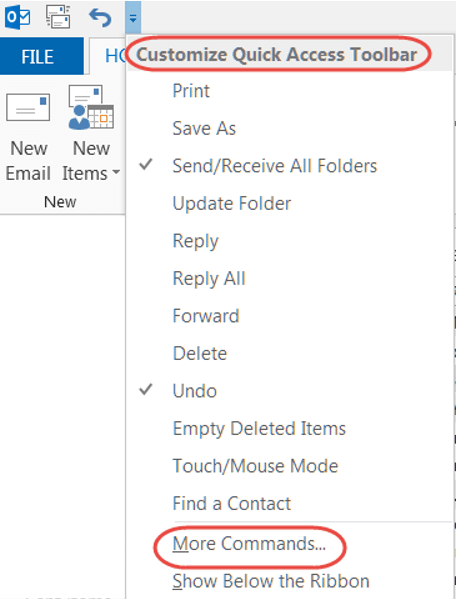
How to customize your Quick Access Toolbar

Getting your favorite features to be just one click away.

Excel, OneNote, Outlook, PowerPoint, Quick Access Toolbar, Word

Looking at your Outlook Inbox in different ways

Viewing your Outlook Inbox is not a “one size fits all” issue.
Inbox, Outlook

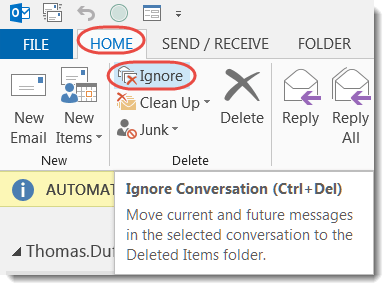
Using Reply All to Get Off an Email Thread… Just Say No

Resist the urge to use Reply All to get off an email thread.

Ignore, Outlook

Using Quick Steps in Outlook

Outlook Quick Steps can simplify those repetitive email tasks.

Outlook, Quick Steps

Posts navigation

Older posts
Newer posts

Search

Text Widget

This is a text widget, which allows you to add text or HTML to your sidebar. You can use them to display text, links, images, HTML, or a combination of these. Edit them in the Widget section of the Customizer.
Blog at WordPress.com.
  • Subscribe Subscribed
    One Minute Office Magic
    Join 81 other subscribers

    Have a WordPress.com account? Log in now.

  • One Minute Office Magic
    View site in Reader
    Manage subscriptionsSign upLog in
    Report this content
    Collapse this bar
Loading Comments...