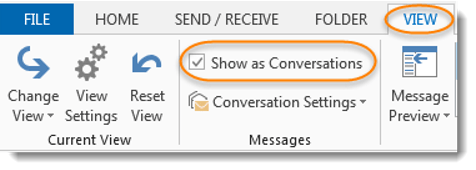
Have you ever received an email, then a reply to that email, and another reply to that email, and another, and so on? Have you felt like you should review each email to see what had changed in order to make sure you hadn’t missed anything?
Learning new Microsoft Office tricks in "just a minute"
Have you ever received an email, then a reply to that email, and another reply to that email, and another, and so on? Have you felt like you should review each email to see what had changed in order to make sure you hadn’t missed anything?
It’s that time of year again!
Each year, Eric Ligman from Microsoft has a blog entry that posts links to a LARGE collection of FREE ebooks on Microsoft technology. There’s no catch, it’s all legal, and it’s simply a “thank you” to everyone who is a Microsoft customer or partner. They are full versions of the titles, they are not time-bombed, etc. They are really and truly FREE for downloading.

There is an Ignore feature in Outlook that allows you to move all the current (and future) emails in a particular thread or conversation into the Delete folder.
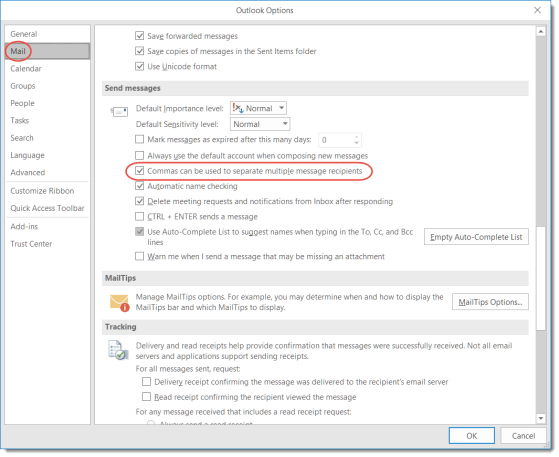
If you’ve been using email clients (like Outlook) for years like I have (translation: I’m old), you may have become used to using the semicolons to separate email addresses in the To, CC, and BCC fields. But you *can* make a change in Outlook to allow the use of commas.
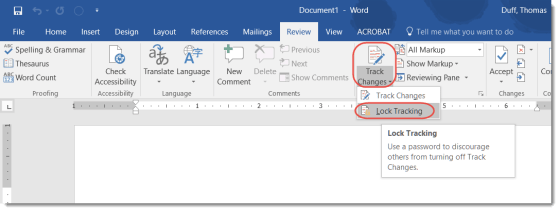
Sometimes the Track Changes feature in Word is a nice convenience, but at other times it’s a critical requirement to make sure no one changed the contents of a document. To prevent someone from hiding their changes by turning off the Track Changes feature, you can add a password to lock people out from turning it on and off. Here’s how that works…
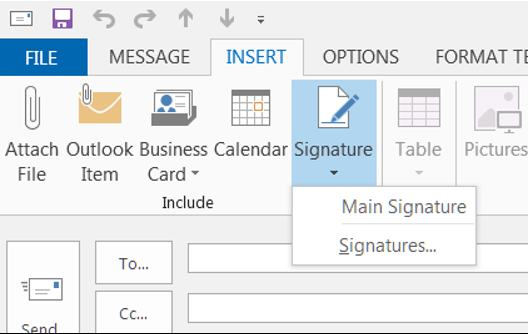
Today’s tip comes to us via a work colleague… I didn’t know that the Signature feature in Outlook could be used in so many different ways! Check out the two links below for details on how to create, use, and manage signatures.
The key to inserting any of your signatures in an email is to place your cursor within the body of the email (wherever you’d like the signature text to go) and select Insert > Signature.
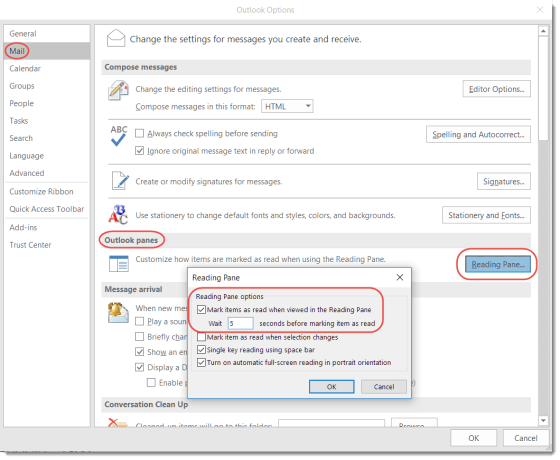
So this was a new one for me… I use the Reading Pane in Outlook quite a bit, but I didn’t realize you could control how long it takes for an email to be marked as Read based on how long it appears in the Reading Pane. Here’s how you do it…

When I go to start a new Word document or Excel file, I nearly always take the default blank template in the upper left corner. However, I recently decided to scroll down and see what Excel file templates were out there. I was amazed at what options I had to create something that was “out of the ordinary”.
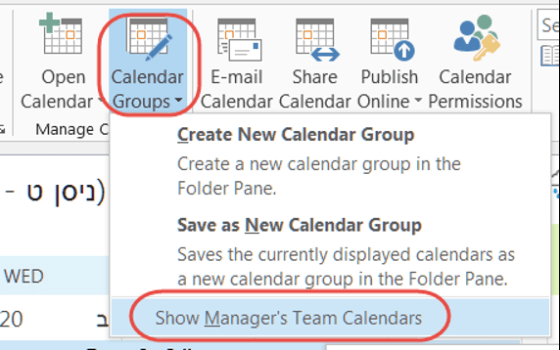
One of my colleagues pointed out a really cool trick for quickly adding all the calendars of your team members to your Outlook client without having to look each one up individually.

