One of the latest updates to SharePoint Online is the addition of a Footer option in the Change The Look Settings list. It’s a nice way to have a graphical user interface (GUI) for adding and maintaining a footer in your Communication sites (it’s not currently available in Team sites), and it applies to all the pages in the site. Here’s how it works…
Using the Preview feature in SharePoint Online document libraries
When you’re in SharePoint Online, opening up files can often cause new version history entries to be made based on how things are set up. This can be a major issue if people have alerts set to notify them if anything changes! To prevent that, you can use the Preview feature to quickly open the file without causing any version history changes. Here’s how that works…
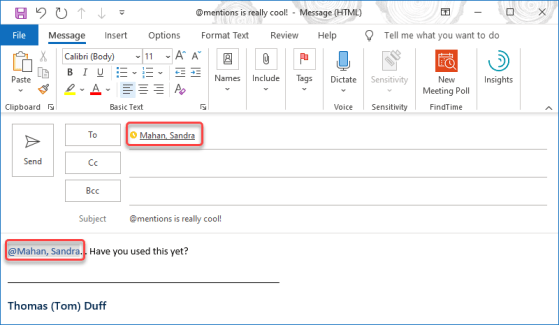
@-less Mentions in Microsoft Teams
Microsoft Teams allows you to flag someone in a chat or conversation by using the @ symbol before their name, such as @Duff, Thomas (the format of our names). There’s now a new way to flag someone’s name, and all you have to do is start typing their name. You don’t need the @ any more. Here’s how that works…
Updating hyperlinks in a Word document
Sandra Mahan recently found a cool tip for a customer who needed to update hyperlinks in a Word document, preferably without having to edit each hyperlink separately. She found the keyboard shortcut of ALT-F9 which displays the underlying hyperlink so you can do replacing. Here’s how that works…
My slides from the Minnesota Microsoft 365 User Group presentation on SharePoint Migrations
My slides from the Minnesota SharePoint User Group presentation on Office 365 Productivity Tips
Giving people Praise in Microsoft Teams
When you’re in Microsoft Teams, collaborating with all your coworkers, you might feel the need to call out someone for the excellent work they’ve done or the help they’ve given you. You can do that now with the Praise feature. Here’s how that works…
Exporting a Planner to Excel
This is a new feature that came about from people requesting and upvoting it on the Planner UserVoice site. You can now export your Planner to Excel in order to work with it further. Here’s how that works…
Decluttering your Microsoft Teams list of workspaces
After you’ve been using Microsoft Teams for a bit, there’s a good chance you’ll “collect” a large number of Teams that you’re part of. That can make your list of Your Teams long and unwieldy. Fortunately, there’s a new feature that will keep that list under control and hide the Teams that you don’t use as much (or at all). Here’s how that works.