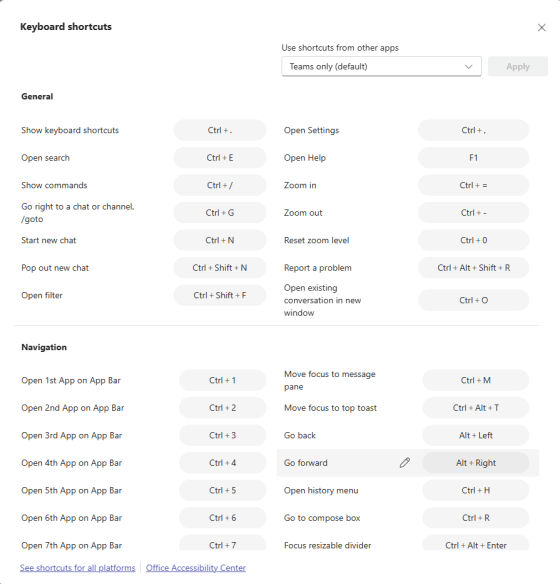
If you’re a keyboard shortcut person, you may have done a lot of searching for how to use all the various keyboard shortcuts in Microsoft Teams. There’s an easy way to get that entire list… just press CTRL-. (period). Here’s what it looks like…
Learning new Microsoft Office tricks in "just a minute"
If you’re a keyboard shortcut person, you may have done a lot of searching for how to use all the various keyboard shortcuts in Microsoft Teams. There’s an easy way to get that entire list… just press CTRL-. (period). Here’s what it looks like…
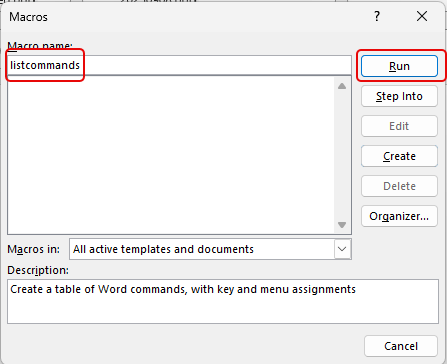
I ran across this cool tip the other day… You probably know some basic keyboard shortcuts that you use in Microsoft Word, but have you ever seen the entire list of keyboard shortcuts that work in Word? Using this tip, you can easily get a list of all of them. Here’s how that works…
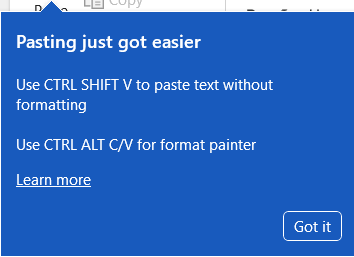
My wife (who does user adoption and training for Microsoft 365 software) ran across this new feature that popped up on her browser-based Word document the other day. Now you can use a keyboard shortcut to paste in plain text without having to use a drop-down menu to do so. Here’s how that works…

It’s so frustrating when you do Ctrl+C to copy some text, and when you paste it into something like an email, it copies over all the text formatting too. So you head over to Notepad to paste it there (to lose the formatting), and then you copy and paste it into something like Outlook or Teams to get just the text. Today I learned that you can use Ctrl+Shift+V (or Option+Shift+Command+V on a Mac) to paste over content without formatting! Here’s how that works…

If you have a spreadsheet that has a lot of column filters set, it can be laborious (and probably error-prone) to try and delete all the filters one at a time. But by using the CTRL – SHIFT – L keyboard shortcut, you can turn them all off at once. Here’s an example…

Sandra showed me a cool trick today that is useful for anyone using Microsoft Teams. You can quickly get a pop-up list of all the keyboard shortcuts that might save you a few seconds every time you do something out in Teams. Here’s how it works…
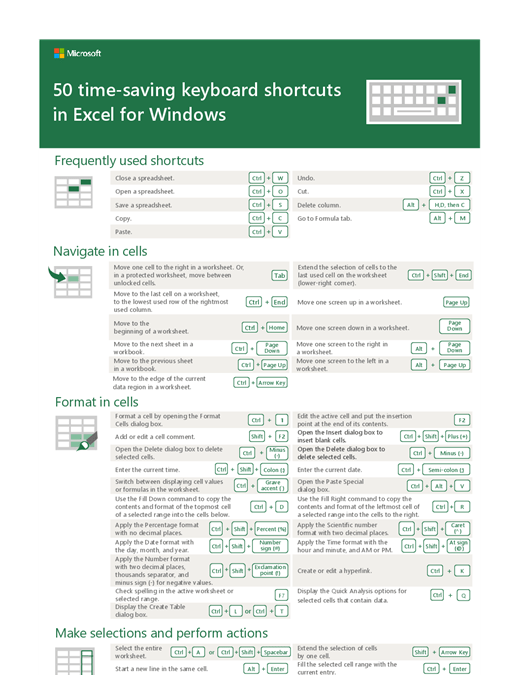
Are you the type of person who likes to use keyboard shortcuts when you’re working with software? If you do, here’s a great resource for keyboard shortcuts in Excel.
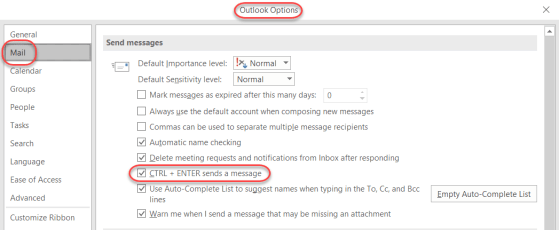
I know a number of my readers are keyboard wizards, and they would prefer do most/all functions using keyboard shortcuts rather than the mouse. I just learned this shortcut today… sending an Outlook email using the CTRL + ENTER shortcut…

Not being an Excel guru, I tend to do things manually instead of using features that can make things a LOT faster… such as selecting all the data in an Excel spreadsheet. I’ve been known to do a lot of scrolling to find the end points and dragging to select everything. It’s a lot easier just to use the CTRL-A keyboard shortcut!
 One Minute Office Magic