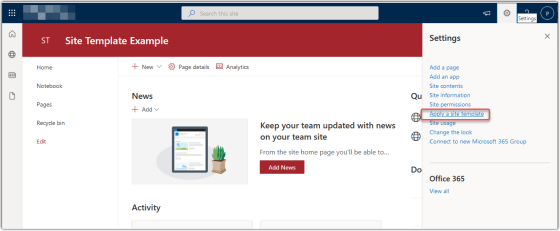
Microsoft has added a new feature for SharePoint Online sites involving the ability to apply a site template to your site. They have provided a number of templates for both Communication sites and Team sites. I’m going to show you how it’s done, and then give you some guidance on what you need to consider before you try this out…
Category: SharePoint Online
SharePoint Online Page Detail Editing
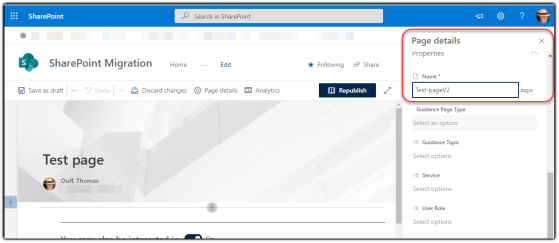
There are times when you need to change the URL (or even delete) a SharePoint Online page. It’s now a lot easier to do both of those items using the Page Details panel when you’re editing a modern SharePoint Online page. Here’s what that looks like…
Changing the Title Region Gradient on SharePoint Online pages
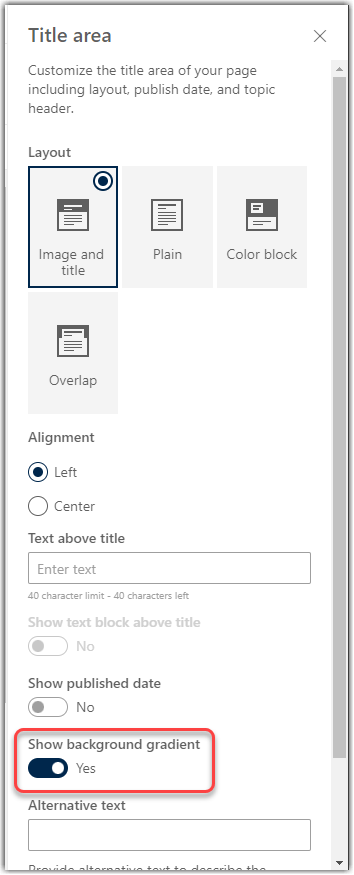
more). But now, you have the option to turn off the Title Region Gradient for more control over that image. Here’s how that works…
Cleaning up document libraries in SharePoint Online using Preview
Sandra Mahan just blew my mind with a feature in SharePoint Online that makes cleaning up document libraries *so* much easier… the Preview feature. It’s probably been there for a long time, but neither of us had really used it before. Here’s how it works…
Changing your SharePoint Email notification settings
Microsoft has rolled out a new option that helps you control certain automatic email notifications you get within your SharePoint environment. Here’s how this option works…
Editing a SharePoint page or news post in Microsoft Teams
If you have tabs in your Microsoft Teams space that show SharePoint pages or news posts, you can now edit those pages from directly within Teams. Here’s how that works…
Page Analytics for SharePoint Online modern pages and news posts
there wasn’t a great way to drill into analytics for a particular page. Those types of statistics are now available using the Analytics feature on SharePoint Online modern pages and news posts. Here’s how that works…
Creating calendar views for your SharePoint Online lists
While a tabular list makes sense for much of the data you store in a SharePoint list, sometimes it makes more sense to show the list items in a calendar view format. Fortunately, it’s easy to generate a calendar view in your SharePoint Online lists. Here’s how to do that…
Focus mode for modern SharePoint pages
While a modern SharePoint page looks nice, there are times where you may want to maximize the amount of content you can view on your screen (like if you’re working on a small laptop). Focus mode for modern SharePoint pages allows you to click on an icon and hide the site header, site navigation, and global navigation. Here’s how it works…