Recently Microsoft Teams offered a standard set of background images for your Microsoft Teams meetings. You *could* add your own images, but it was more of a hack and wasn’t something you’d necessarily want to advertise. Now, there’s an easy way to do this, and here’s how it works…
Category: Microsoft Teams
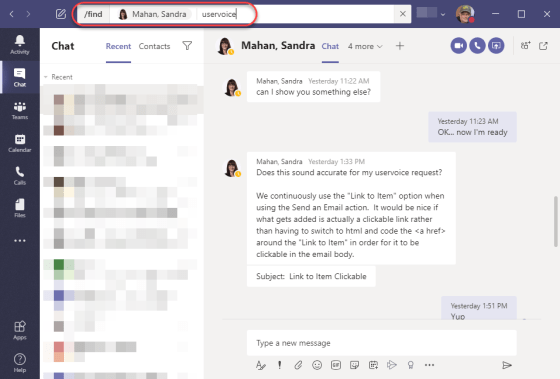
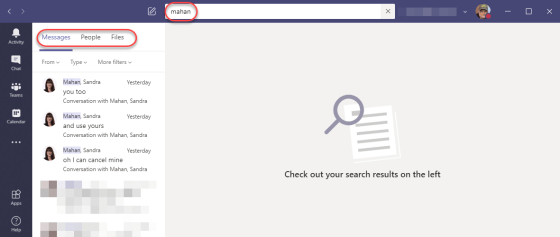
Searching in channels and chats for Microsoft Teams
While Microsoft Teams is a great way to keep information consolidated for your work, the capability to find things in various chats and channels has been somewhat limited. With the addition of enhanced searching in Microsoft Teams, that now becomes much easier. Here’s what it looks like and how it works…
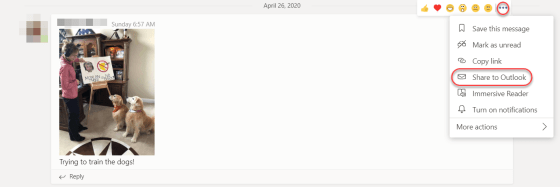
Sending a Microsoft Teams conversation to Outlook
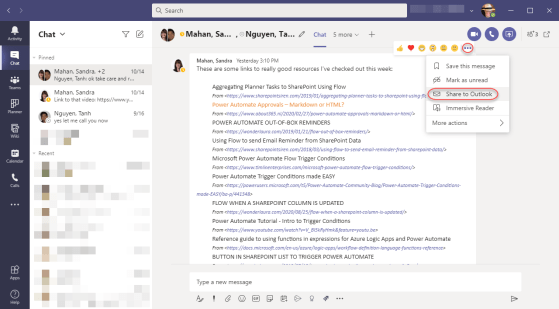
There are times when you have a conversation in a Microsoft Teams channel, and you want to alert someone to check it out via email (because that’s what they prefer to use). Christian Buckley shared this really cool feature that enables you to send a chat directly to Outlook, and gives the recipient an easy way to get to the conversation in question. Here’s how it works…
Making “pretty links” in Microsoft Teams with CTRL-K
I know I’ve covered the use of CTRL-K in Word before, as a means to create “pretty links” in a Word document. There were alternative ways to do that in Word, but there seems to be a lack of user interface options to do the same thing in Microsoft Teams. Here’s how you can use the keyboard shortcut of CTRL-K to format words and phrases into hyperlink URLs…
Background images in Microsoft Teams meetings
With the massive increase in Microsoft Teams meetings due to people working remote because of the COVID-19 virus, there’s been a lot of comparisons between Teams and Zoom for online meetings. One of the things that Zoom does that Teams meetings didn’t was allow for background images. That is now corrected with the latest Teams update. Here’s how that works…
Using Tags in Microsoft Teams channels
With the increase of Microsoft Teams usage during the virus stay-at-home orders, the message traffic in various channels has skyrocketed. This can make it hard to notice things that are relevant to you and your job function. A new feature called Tags can make it easier to target messaging to specific groups of people in a channel. Here’s how it works…
Testing your Microsoft Teams calling with /testcall
With the corona virus running rampant around the world, many people are working remotely from home in order to help stop the spread of the disease. Microsoft Teams has become a vital part of this remote working scenario, but not everyone is sure that they’re set up properly to have a call or a meeting using Teams. You can use the /testcall feature in Teams to see how your remote set-up is working. Here’s how to do that…
Seeing your Planner Tasks in Microsoft Teams
While working with Sandra Mahan the other day, she happened to notice a feature in Microsoft Teams that shows you all the Planner Tasks that have been assigned to you. The best thing is… it’s automatic! Here’s what it looks like…
Enhanced Meeting Scheduling in Microsoft Teams
In their quest to get Microsoft Teams to have feature parity with Outlook when it comes to meetings, there’s been a few features added to Microsoft Teams meeting scheduling that make it even closer to how you schedule meetings in Outlook. Here’s an overview of the ones that are most important and/or apparent…