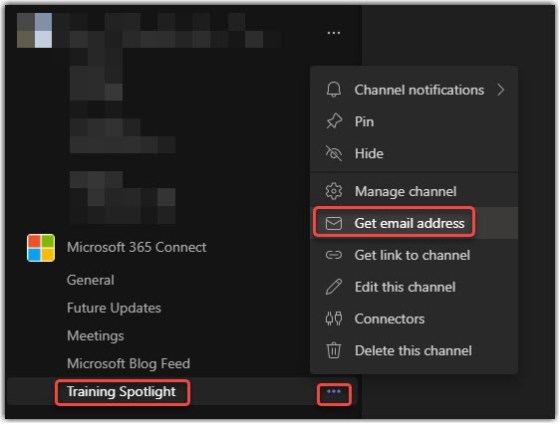
In one of our Teams channels, we like to post “future updates” that we get from the Microsoft Message Center. But having to copy and paste content from the email we receive can be a real pain. An easier way to do this is to use the channel’s email address to send (or forward) the content directly to the Teams channel. Here’s how that works…
Category: Microsoft Teams
Forms: Distribute your forms by using Teams as a new channel
Microsoft has a new feature for Forms that allows you to publish the form directly to a channel in Teams (instead of having to get a link and post it somewhere). Here’s what that looks like…
Microsoft Teams: Usability Improvements to In-Meeting Notifications
One of the things I’ve always found frustrating about Teams meetings is how all the various notifications show up all over the place. Chat messages in the lower-right corner, recording messages as a bar across the top, etc. Now with this set of changes, all the in-meeting notifications will be consistent and show up in a common area. Here’s what it looks like…
Creating Tasks from a Microsoft Teams chat entry
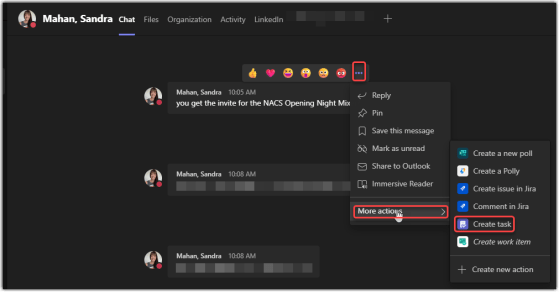
The nice thing about having a wife who is a user training and adoption specialist is that she lets me know about cool tips she finds… and this one is pretty cool! You can create a task from a Microsoft Teams chat entry, which is perfect when you have something you need to follow up on. Here’s how that works…
Sending a Microsoft Team chat message from the search bar
Sandra Mahan showed me a cool tip the other day when it comes to sending a Microsoft Teams chat message. You can do that without even leaving the chat bar at the top of the screen! Here’s how that works…
Microsoft Teams – Pop out shared content in a meeting
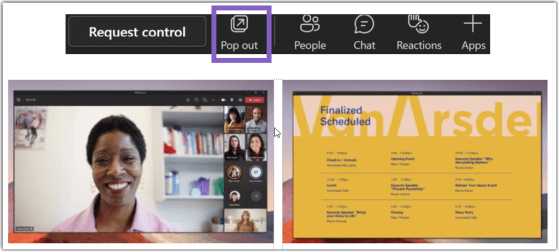
If you work with two monitors, you’ve probably wished you could do a better job of managing Teams during a meeting. More specifically, it’d be nice if you could have the shared content in a meeting move to a separate window so you can more easily work with the rest of Teams. Now you can! Here’s how that works…
Using Adjust Brightness and Soft Focus in your Microsoft Teams video meetings
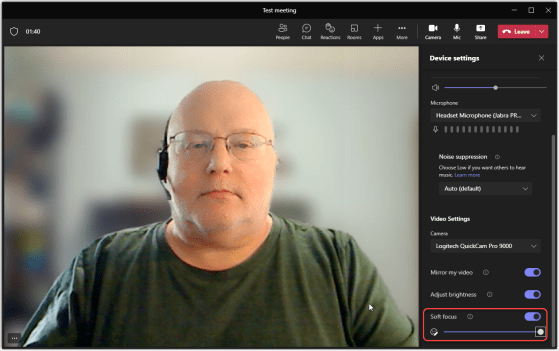
High-definition cameras are great for some things, but there are times you *really* don’t want people seeing all the “fine detail” on your face during a video call. Microsoft Teams now has two settings that will help smooth things out a bit… Adjust Brightness and Soft Focus. Here’s how they work…
3D (Fluent) emoji in Microsoft Teams
Another change that hit my Microsoft Teams desktop client is the change to the emoji palette. Instead of the flat 2D emoji, they are now “3D” and have some depth. The formal name that Microsoft calls the styling is Fluent emoji. Here’s what they look like, as well as hidden trick for the people emojis…
Automatic Groupings available in Teams for channel posts
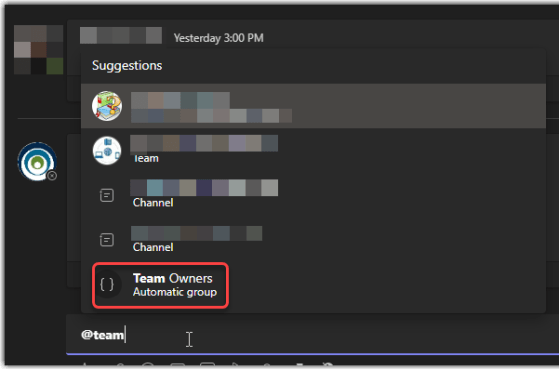
Microsoft Teams now has a new feature called Automatic Groupings. This is a notification group for posting in Teams channels, and it will automatically notify everyone in that group. The new automatic posting group is @Team Owners, and this is how it works…