Remove toggle for Calendar in Teams

As you might have noticed, Microsoft Teams has a new Calendar experience that you’ve been able to toggle on and off. The new experience is designed to more closely mirror your Calendar experience in Outlook. Microsoft announced this morning that they will be removing the toggle switch in September, and at that point everyone will be in the new experience. Here’s the Microsoft announcement wording:

Past calendar event color changes for Outlook on the web

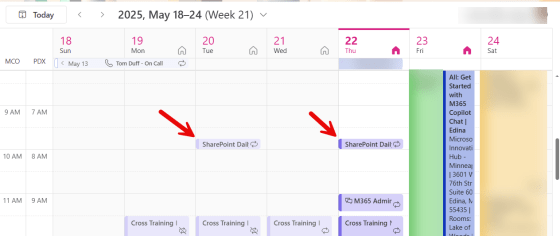
So… this isn’t an earth-shattering change, but It’s sort of interesting. Sandra noticed yesterday that when viewing the Outlook calendar on Outlook on the web, meetings that were before the current date and time now appear in a lighter color gradient than current/future meetings. Here’s what that looks like…

Right-Click RSVP options for meetings in Outlook on the web

It used to be that if you were using Outlook on the web for your calendar and you wanted to RSVP a meeting invite, you had to either open up the calendar entry or navigation through an RSVP fly-out menu if you right-clicked on the meeting entry. Now, the Yes/No/Maybe options are available at the main level of the right-click menu. Here’s how it looks…

Scheduling in-person meetings in Outlook on the web

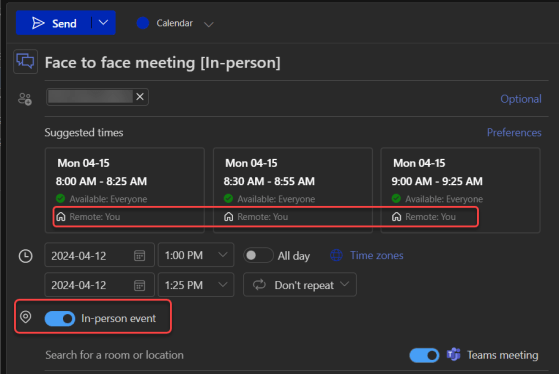
There’s a change that’s in the process of rolling out right now, and it’s pretty interesting. When creating a meeting in Outlook on the web, you can designate it as an “in-person” meeting that people should plan on being present for. RSVPing to the meeting gives you additional options to say you’ll attend in-person or virtually, so that the organizer can know how many people will be physically present. Here’s how this looks and works…

Meeting participants time-zone notifications

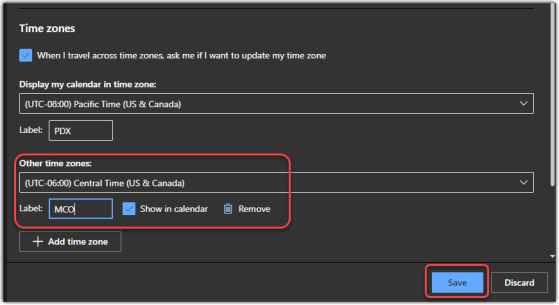
If your organization is spread out over multiple time zones, it can be hard to set up a meeting if you’re not aware of what time it might be for a particular group of people. Maybe a 4 pm meeting is good for you on the west coast of the US, but it would be 7 pm for those on the east coast. Now, if you’re using Outlook on the browser, you can see the attendee time zones when using the Scheduling Assistant. Here’s what that looks like…

Filtering out calendar entries on Outlook for the web

If you’re like me, you often screen share and demo things for your customers. But when it comes to showing off things like my calendar, there are times when I’d rather not show things that I have marked as private. I recently learned you can filter your calendar display on Outlook for the web. Here’s how that looks…