Episode 140 of the Microsoft 365 Pulse Roadmap webcast is now out on YouTube. Join Tamara Bredemus and myself as we cover this week’s updates.
Learning new Microsoft Office tricks in "just a minute"
Episode 140 of the Microsoft 365 Pulse Roadmap webcast is now out on YouTube. Join Tamara Bredemus and myself as we cover this week’s updates.

One Minute Office magic reached the 500 post milestone today! I started writing SharePoint posts back in 2015, and then slowly widened the focus to Office 365 (now Microsoft 365). I can’t believe I’ve produced and shared that much content over the years…
Here’s to another seven years and 500 posts. Thanks for being part of the journey!

For each section on a SharePoint Online page, you can add a number of web parts, such as image and text web parts, to make attractive pages. However, if you’re like me, you may not have a keen eye for design and layout. Microsoft is making that a bit easier now by giving you Section Templates on the pages. Here’s how that works…
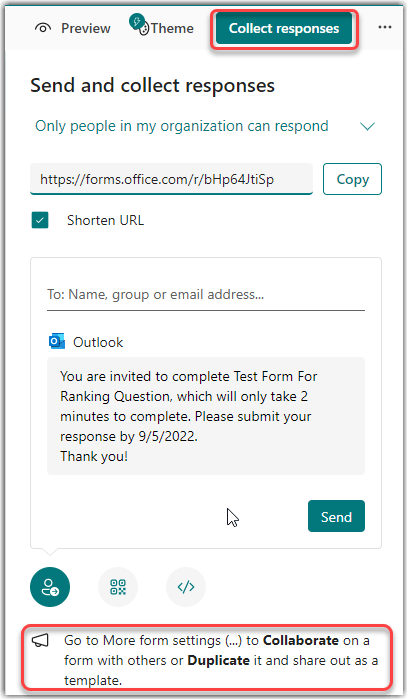
When Microsoft Forms first came out, there was a single button that had the options for both collecting responses from people and for letting others collaborate on building your form. Unfortunately, this often led to people getting links to collaborate when in reality they should have only been able to respond. Now, Microsoft has split those two options out to clarify the options. Here’s what that looks like…
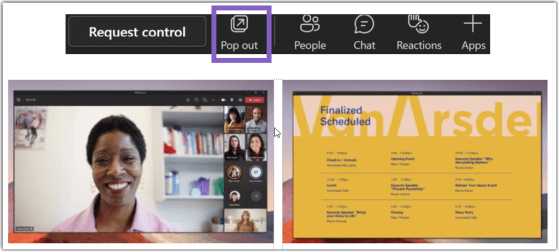
If you work with two monitors, you’ve probably wished you could do a better job of managing Teams during a meeting. More specifically, it’d be nice if you could have the shared content in a meeting move to a separate window so you can more easily work with the rest of Teams. Now you can! Here’s how that works…

Episode 139 of the Microsoft 365 Pulse Roadmap webcast is now out on YouTube. Join and myself as we cover this week’s updates.

Have you ever interviewed someone, saved the audio file to your computer, and then had to start the laborious task of transcribing it? By using Word for the web, you can upload that audio file and Word will transcribe it for you! Sounds like a great way to get the majority of your transcription work done automatically. Here’s how it works…

Episode 138 of the Microsoft 365 Pulse Roadmap webcast is now out on YouTube. Join Tamara Bredemus, Adam Ochs, and myself as we cover this week’s updates.
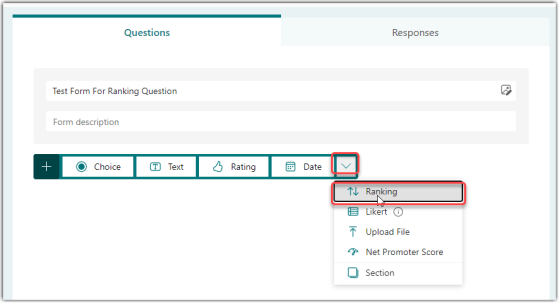
When you’re creating a Microsoft Forms questionnaire, you might want to give people a list of options and provide the opportunity to move them around into a preferred order. You can do that with the Ranking question type. Here’s how that works…
 One Minute Office Magic