Subjecting your fellow meeting attendees to your background noise is distracting to everyone.

Learning new Microsoft Office tricks in "just a minute"
Subjecting your fellow meeting attendees to your background noise is distracting to everyone.
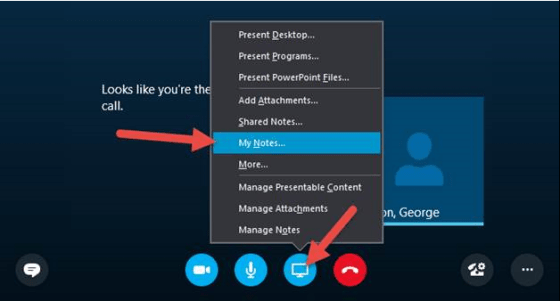
My Notes in Skype for Business is a quick way to start your own personal notes about your Meeting.

Are you on a phone call at your computer and you need to leave your office? Just transfer the call to your own mobile number using Transfer.

Making your Skype for Business links clickable in your Outlook emails.

You can share a PowerPoint presentation to a Skype meeting already in progress.

Making sure you’re displaying appropriate information to your contacts.

The Skype entry/exit chime can be annoying once the meeting starts.

Here’s how to move the “Currently Presenting” bar out of the way when screen sharing.

How to keep yourself from going crazy when using Persistent Chat
 One Minute Office Magic