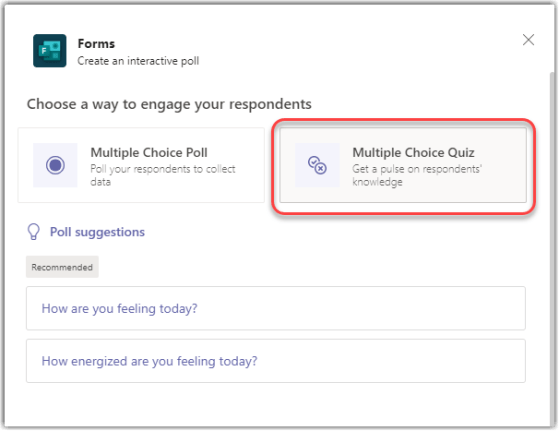
Microsoft Forms is a great way to poll your audience in a Microsoft Teams meeting. Now there’s a feature that also allows you to select a correct answer in a Poll question so that people know if their answer was right. Here’s how that works…
Learning new Microsoft Office tricks in "just a minute"
Microsoft Forms is a great way to poll your audience in a Microsoft Teams meeting. Now there’s a feature that also allows you to select a correct answer in a Poll question so that people know if their answer was right. Here’s how that works…

In Microsoft Forms, you’ve been restricted to plain text for your questions in the form. With this newest update, you can now do basic text formatting, and it helps to make your questions stand out and look more professional (provided you don’t go overboard). Here’s how it works…

Microsoft Forms is a great tool for getting feedback on a various topic. However, if you’re using open text questions, you may find it difficult to get a quick read on basic trends and key words that are appearing in the responses. That’s a bit easier now using the Word Cloud Insights feature. Here’s how that works…

Microsoft Forms is a great tool for data collection, but one thing that has been pretty ugly are the URLs that are generated for sharing those Forms. Microsoft listened to user feedback, and they provided a built-in way to shorten the Forms URL into something that doesn’t cause headaches. Here’s how it works…

To make it easier to start an instant meeting in Microsoft Teams, Microsoft added a Meet Now option in the Teams client some time back. However, if you still live your life in the Outlook client, you had to do some major context switching to get a meeting started. Now you can click on the Meet Now option in your Outlook client calendar, and a new Teams meeting will start up. Here’s how that works…
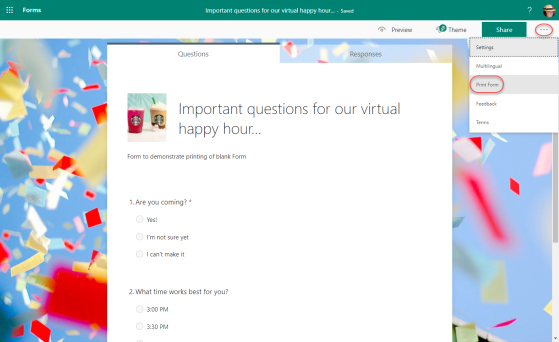
While Microsoft Forms is best used when your recipients are online, there are times when you need to provide a copy of the form to someone who doesn’t have access to your environment. Microsoft Forms accommodates that with the Print Form feature. Here’s how it works…

There’s nothing quite as frustrating in surveys when you answer a series of questions and click Next… and more Next… and more Next… and you have no idea when it’s all going to end. Now in Microsoft Forms, you have the ability to add a Responder Progress Bar so that your responders have hope that it’ll all end soon… Here’s how it works..

Microsoft Forms is a great survey tool, but a number of people were wanting to have a question type that would allow people to upload files when responding to a Forms survey. Microsoft listened, and now Forms will allow for people to create File Upload questions as part of their survey response experience. Here’s now that works…
 One Minute Office Magic