I’ve been asked about some of the odd parameters that are now part of sharing links when you’re grabbing a copy of a link to a file or folder to share with someone else. In trying to research the answer, I found that there’s very little information in a single location that addresses this, so I’m going to give it a shot here. Keep in mind that this is my “best guess” on the topic, and it may not be totally correct and/or may change without notice. 🙂
Tag: SharePoint Online

Renaming URLs in a SharePoint Online site
One of the questions I’ve grown to dread in my years of working with SharePoint is “can we change the URL of my site?” Up until now, the answer was pretty much no, unless you wanted to go through major hassles to create a new site, copy over content, etc. However, Microsoft has finally rolled out a feature to allow you to truly rename a URL, *and* it handles automatic redirects if someone uses the old URL. There are some caveats that I’ll point out at the end of this tip, but here’s how it works…
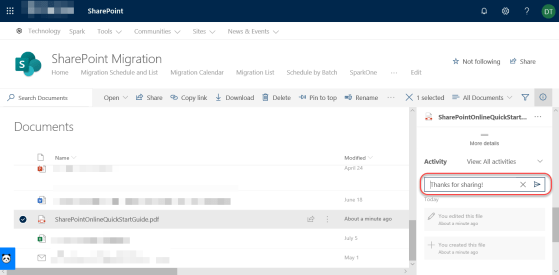
Adding Comments to non-Microsoft files in SharePoint Online and OneDrive
One of the many benefits of storing files in SharePoint Online or OneDrive as opposed to file shares is the ability to add comments to the file for additional context and collaboration. However, until recently that was only allowed for Microsoft files (such as Word, Excel, etc.) Now the ability to add comments has been extended to non-Microsoft files, such as PDF files. Here’s how that works…

Button and Call To Action web parts on SharePoint Online pages
Have you ever needed a quick button on a web page? Or perhaps a way to get people to notice and do something? You can now use the Button and the Call To Action web parts on Modern SharePoint Online web parts. Here’s how…
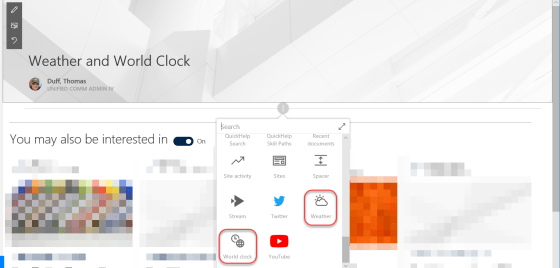
Weather and World Clock web parts on SharePoint Online pages
In SharePoint Online modern web pages, there are two new web parts that might look nice on your intranet home page… the Weather and the World Clock web parts. Here’s how they work…
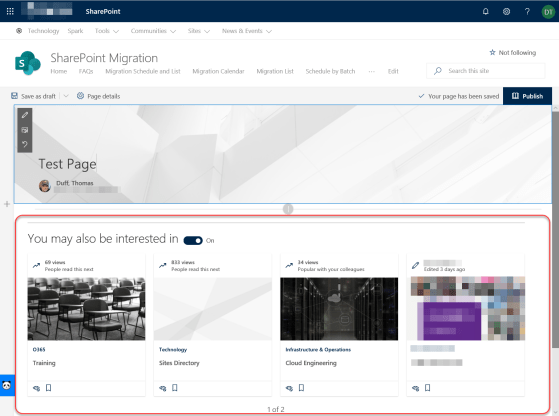
SharePoint News and Page Recommendations feature
This is a new feature in SharePoint Online that will help people find content related to their specific interests based on prior page views and activities. It’s the News and Page Recommendations feature that is added to the bottom of newly created pages in SharePoint Online.

SharePoint Online now has a Footer properties option
One of the latest updates to SharePoint Online is the addition of a Footer option in the Change The Look Settings list. It’s a nice way to have a graphical user interface (GUI) for adding and maintaining a footer in your Communication sites (it’s not currently available in Team sites), and it applies to all the pages in the site. Here’s how it works…
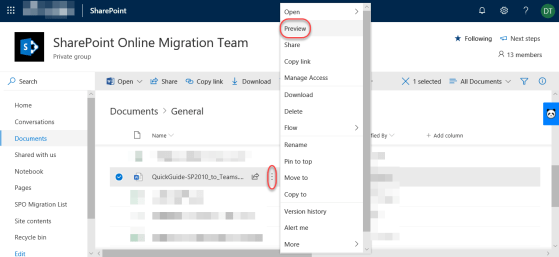
Using the Preview feature in SharePoint Online document libraries
When you’re in SharePoint Online, opening up files can often cause new version history entries to be made based on how things are set up. This can be a major issue if people have alerts set to notify them if anything changes! To prevent that, you can use the Preview feature to quickly open the file without causing any version history changes. Here’s how that works…

My slides from the Minnesota Microsoft 365 User Group presentation on SharePoint Migrations
My slides from the Minnesota Microsoft 365 User Group presentation on SharePoint Migrations

