When looking at a SharePoint list earlier this week, I saw that Microsoft rolled out some changes to how a list and associated views are laid out on a page. Here’s the visual changes and what they do…

Learning new Microsoft Office tricks in "just a minute"
When looking at a SharePoint list earlier this week, I saw that Microsoft rolled out some changes to how a list and associated views are laid out on a page. Here’s the visual changes and what they do…

Episode 210 of the Microsoft 365 Pulse Roadmap webcast is now out on YouTube. Join Tamara Bredemus, Jennifer Mason, and myself as we cover this week’s updates.
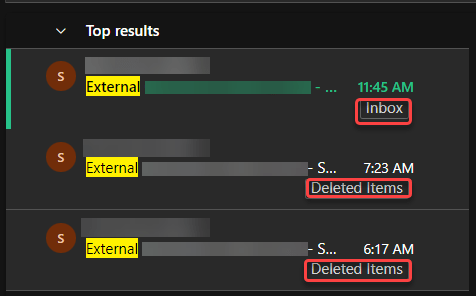
This is yet another reason why I really like using the browser-based version of Outlook. When searching, it automatically shows you the folder where the item was found. Here’s what that looks like…

If you’re part of a group chat in Microsoft Teams, you’ll notice that the icon for that chat is a mix of three profile pictures of the group participants. But it would be nice if you could change that icon to be more representative of the group… or perhaps just more fun. Well, now you *can* change that picture, and here’s how you can do it…

Episode 209 of the Microsoft 365 Pulse Roadmap webcast is now out on YouTube. Join Tamara Bredemus and myself as we cover this week’s updates.

If you’ve built SharePoint pages, you are probably familiar with the four background colors you could use in the sections of your pages. But now, you also have a choice of twelve additional colors/images that you can use. Here’s what they look like and how they work…

If your Microsoft Teams space has a number of channels, you may have wished for a way to archive one or more of those channels without physically deleting them permanently. Now you can! Each channel in a Teams space has an archive option. Here’s what it looks like and how it works…

It’s not unusual for a SharePoint site to be focused on a particular project with an upcoming deadline, and it would be nice to see how much time is remaining before the deadline. You can do that with a Countdown Timer web part on your SharePoint page. Here’s how you set that up and how it looks…

 One Minute Office Magic