Episode 219 of the Microsoft 365 Pulse Roadmap webcast is now out on YouTube. Join Tamara Bredemus, Adam Ochs, and myself as we cover this week’s updates.

Learning new Microsoft Office tricks in "just a minute"
Episode 219 of the Microsoft 365 Pulse Roadmap webcast is now out on YouTube. Join Tamara Bredemus, Adam Ochs, and myself as we cover this week’s updates.

I used to find it frustrating if I inadvertently made a change while editing a Power Automate workflow, only to have to bail out and start from scratch again. Power Automate now
has Undo and Redo links at the top of the editing canvas to avoid these situations. Here’s what that looks like…
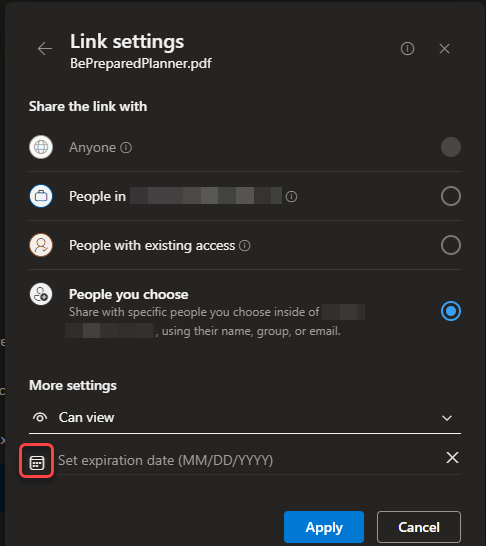
It used to be when you’d share a file in SharePoint or OneDrive, that link was valid until such time as you removed the person from the access to the file. Now you can simply set an expiration date on the link, and they will no longer be able to access the file after that date. Here’s how that works…

Episode 218 of the Microsoft 365 Pulse Roadmap webcast is now out on YouTube. Join Tamara Bredemu and myself as we cover this week’s updates.

If you have a lot of emails in Outlook on the web, you might wish you had a way to make emails that fix a particular category stand out from the others. Now you can do that with Conditional Formatting, Here’s how that works and looks…
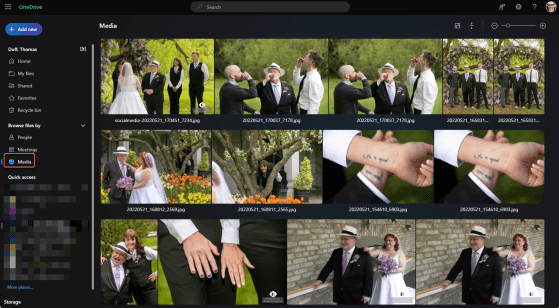
OneDrive is a great repository for all your files that you have stored on your computer, but it can be really hard to find that particular picture or video stored on your OneDrive if you don’t know the exact search terms. Now you can “filter” your OneDrive content to only show you your media files, such as pictures or videos. Here’s how easy that is…

Episode 217 of the Microsoft 365 Pulse Roadmap webcast is now out on YouTube. Join Adam Ochs, Jennifer Mason, Tamara Bredemus, and myself as we cover this week’s updates.
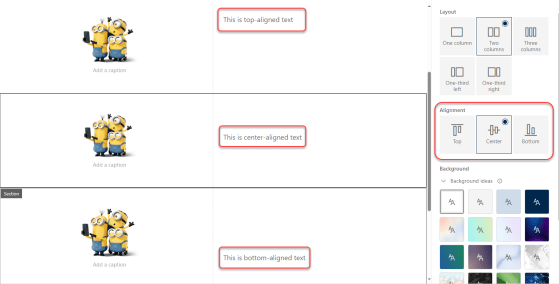
By default, content in 2- and 3-column sections in a SharePoint page always put the content at the top of the section. This could lead to “less than appealing” page layouts if you had a larger image with just a small amount of text in the second column. You ended up with a lot of white space that couldn’t be used for anything. Now, you have the option to pick the alignment of content along the top, center, or bottom. Here’s how that works…

When you have an image web part on a page, your image is pretty much shaped in some sort of square/rectangle format (unless you do something fancy prior to using it). Now the Image web part gives you the option to apply a shape to the image to make it stand out on the page, Here’s how that works and the different shapes you have available…
 One Minute Office Magic