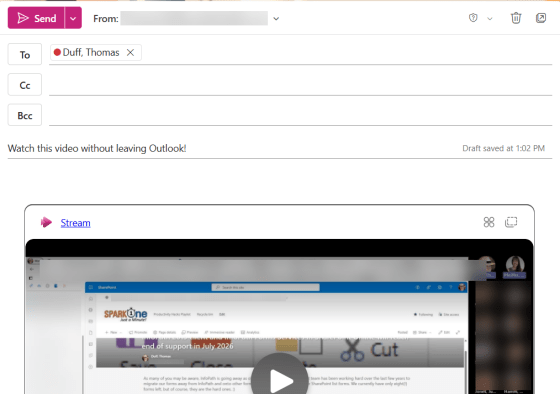
This is something that Microsoft has had on the roadmap seemingly forever, but every time I tested to see if it had been rolled out… it wasn’t. Now it is! If you put a video link in an email (and you’re using Outlook on the web), that video will show up in the actual email, and you can watch it from there without going to some other location. Here’s what that looks like…
Category: Outlook
Theming Outlook on the web with Copilot
Here’s a fun thing you can do with Copilot. If you’re using Outlook on the web, you now have an option to allow Copilot to come up with a theme for Outlook. It may not be quite “ready for prime time”, but it’s kind of fun. Here’s what it is and how it works…
Creating colored folders in New Outlook and Outlook on the web
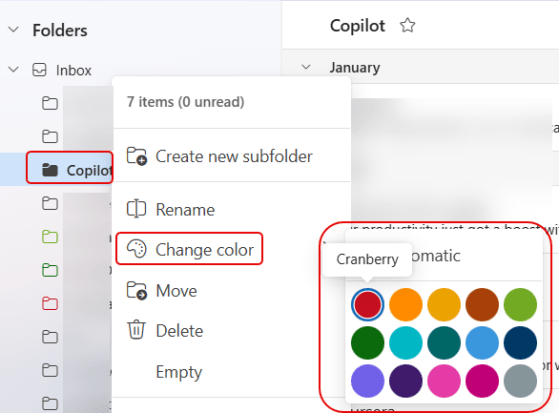
If you’re looking for a small color accent for all your Outlook folders, you can now do that using the Change Color feature. Here’s how that works and looks…
Categorize single items in conversation view in Microsoft Outlook for the web
If you’re a categorizer of emails in Outlook, you probably found it frustrating in Outlook on the web in that you couldn’t categorize a single email in a conversation thread. It would categorize everything in the thread. Now, you have the ability to pick and choose exactly what you want to have categorized in the conversation. Here’s how that looks…
Searching the attendee list in Outlook on the web
If you’re using Outlook on the web and you’re looking at a long attendee list for a meeting, it may take you a while to find the person you’re looking for. Fortunately, there’s now a search function you can use in the attendee list to make it easy to find the person to see if they’ve accepted, declined, or ignored the invite. Here’s how that works…
Sorting the attendee list for Outlook on the web
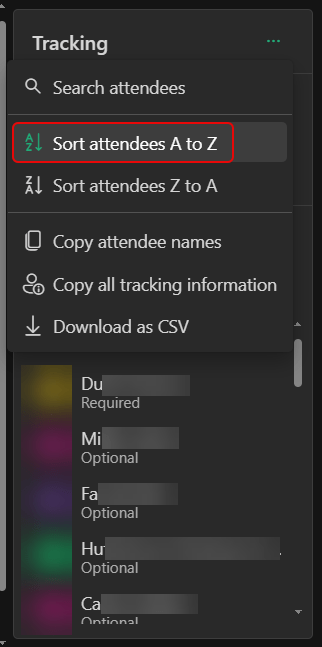
If you’re using Outlook on the web and you’re looking at the attendee list for a meeting, you’ll notice the name order is pretty much random (probably first come, first serve). That makes it really hard to wade through the list of people to look for someone. Now you can actually sort the list alphabetically. Here’s how that looks…
Using the Follow RSVP option in Outlook on the web
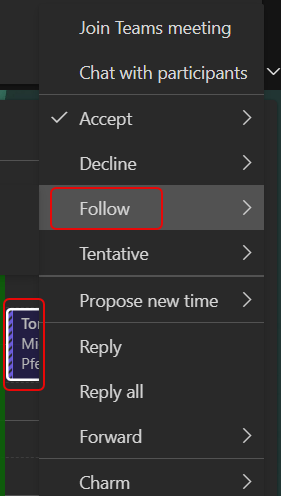
In today’s world of too many meetings, you likely find yourself double- and triple-booked all day long. You feel like you have to accept all the meetings as they are important and you want to keep track of things, but it turns your calendar into a nightmare, and the organizer doesn’t know whether you truly will or will not be there. Now, you can use Outlook on the web (or the New Outlook for Windows client if you’re using that) to RSVP with a Follow option. Here’s what that looks like and how it works…
Outlook on the web – Changes to your Account Settings
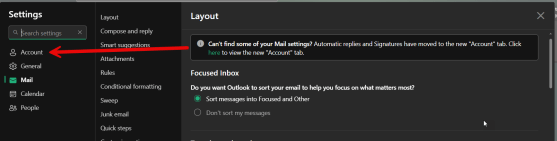
When going to update some account settings in Outlook on the web, I noticed that certain things were missing in terms of where I normally would find them… such as the Automatic replies and Signatures. Turns out they’ve been moved from the Mail tab to the new Account tab. Here’s what that looks like now…
Microsoft Outlook: Copy meeting attendee responses to clipboard
This is a new feature that has been asked for on numerous occasions. Now in an Outlook meeting, you can copy the attendee list (and status) to your clipboard… or even export it to a CSV file! This should be out to everyone by late December, and here’s what you’ll see when it shows up…