Skip to content

One Minute Office Magic

  • Facebook
  • LinkedIn
  • Twitter
  • Instagram

Learning new Microsoft Office tricks in "just a minute"

  • Home
  • About
  • Contact

Tag: Version History

Changes to file share versioning in SharePoint

A new change is now available when it comes to versioning in SharePoint document libraries. It used to be that you could only control the number of versions you kept. Now you can also add a time-based element to your versioning. This is what it looks like and how it looks…

SharePoint Online, Version History

Using Page details for version history in SharePoint Online pages

Sandra “clicked a button” the other day, and noticed a cool feature in the Page details option at the top of a SharePoint Online page. You can examine the version history of the page, and see what web parts were edited or deleted. Here’s how that works…

SharePoint Online, Version History

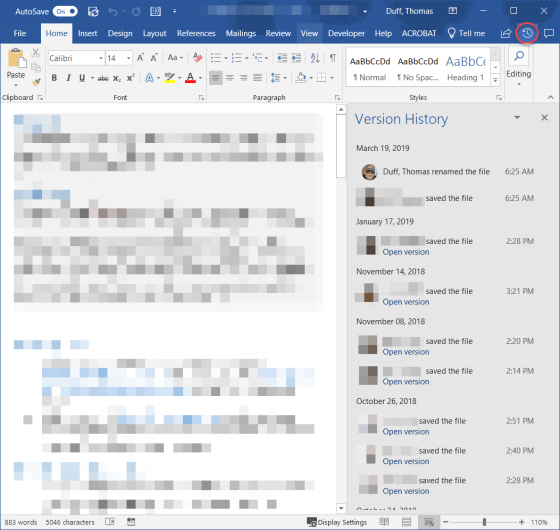
Version History on Office files shared in SharePoint and OneDrive

When you have an Excel, Word, or PowerPoint file open that has been shared in SharePoint Online or OneDrive, there’s an easy way to see when and who updated the file using the Version History icon in the Ribbon Bar. You can also easily see the actual file in earlier versions. Here’s how…

Excel, OneDrive, PowerPoint, SharePoint Online, Version History, Word

Search

Text Widget

This is a text widget, which allows you to add text or HTML to your sidebar. You can use them to display text, links, images, HTML, or a combination of these. Edit them in the Widget section of the Customizer.
Blog at WordPress.com.
  • Subscribe Subscribed
    • One Minute Office Magic
    • Join 83 other subscribers
    • Already have a WordPress.com account? Log in now.
    • One Minute Office Magic
    • Subscribe Subscribed
    • Sign up
    • Log in
    • Report this content
    • View site in Reader
    • Manage subscriptions
    • Collapse this bar