Episode 155 of the Microsoft 365 Pulse Roadmap (and 2023 predictions!) webcast is now out on YouTube. Join Tamara Bredemus and myself as we cover this week’s updates.

Learning new Microsoft Office tricks in "just a minute"
Episode 155 of the Microsoft 365 Pulse Roadmap (and 2023 predictions!) webcast is now out on YouTube. Join Tamara Bredemus and myself as we cover this week’s updates.
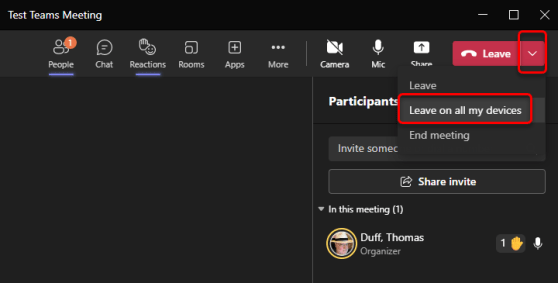
Microsoft Teams meetings are great in that you can join on one device (like your Teams desktop client) and then switch over to using your iPhone to listen to the meeting if you have to walk away. However, if you join the meeting from a second device (instead of switching devices), it can be hard to completely leave the meeting on both devices. Teams now allows you to leave a meeting on all devices when you’re ready to exit the meeting. Here’s how that works…
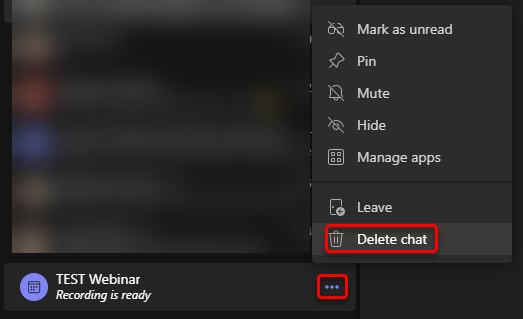
If you’ve used Microsoft Teams for any length of time, you know your list of chats can grow pretty long in a relatively short period of time. Trying to scroll through the list of chat to find one that you really want to look at can be a pain. Now, Microsoft Teams will let you delete chats in your chat list, and it only affects the chat on your own Teams client. Here’s how that works…

Episode 153 of the Microsoft 365 Pulse Roadmap webcast is now out on YouTube. Join Jennifer Mason, Tamara Bredemus, Adam Ochs, and myself as we cover this week’s updates.

This is a change that I’ve been waiting *months* for! You can now type a message in a Teams chat and choose to send it at a later date! This is great when you cover a number of time zones and you don’t want to have people responding to your messages during times when they might normally not be working. Here’s how it works…

Episode 152 of the Microsoft 365 Pulse Roadmap webcast is now out on YouTube. Join Adam Ochs, Tamara Bredemus, and myself as we cover this week’s updates.

Up until now, we’ve had the standard set of reaction emojis to use to convey how we feel about a particular chat message. However, there are times when you’d really like more options… and now you have them. Microsoft Teams has an expanded palette of emojis to meet all your non-word communication needs. Here’s how it works…

Episode 151 of the Microsoft 365 Pulse Roadmap webcast is now out on YouTube. Join Tamara Bredemus and myself as we cover this week’s updates.
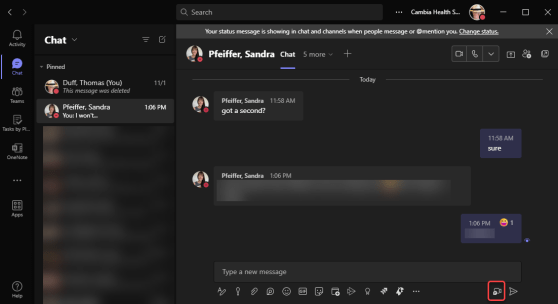
Have you ever wanted to send a message to someone in Teams chat, but it’s a bit too much to try and type it out? Perhaps you can explain it verbally in less than one minute? If so, you will want to check out Teams Video Clips, a new feature that just hit our tenant last week. Here’s how it works…
 One Minute Office Magic