Episode 183 of the Microsoft 365 Pulse Roadmap webcast is now out on YouTube. Join Jennifer Mason, Adam Ochs, Tamara Bredemus, and myself as we cover this week’s updates.

Learning new Microsoft Office tricks in "just a minute"
Episode 183 of the Microsoft 365 Pulse Roadmap webcast is now out on YouTube. Join Jennifer Mason, Adam Ochs, Tamara Bredemus, and myself as we cover this week’s updates.

When you’re in a document library in SharePoint Online and there is a long list of folders, it can be hard to quickly pick out a particular folder you might use on a regular basis. Now you can make it easier to find a particular folder by changing the color of it in the document library. Here’s how that works…
Episode 182 of the Microsoft 365 Pulse Roadmap webcast is now out on YouTube. Join Tamara Bredemus, Jennifer Mason, and myself as we cover this week’s updates.
Episode 181 of the Microsoft 365 Pulse Roadmap webcast is now out on YouTube. Join Jennifer Mason, Tamara Bredemus, and myself as we cover this week’s updates.
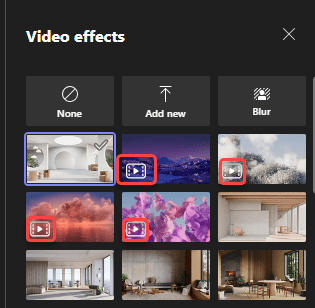
Microsoft Teams has rolled out a new feature that will probably make some people smile, and others unhappy. I’m not sure which one I am yet. It’s the ability to have animated backgrounds when you use your video camera in a Teams meeting. Before you run off and grab your favorite Star Trek warp speed video background, read on for the restrictions and cautions…
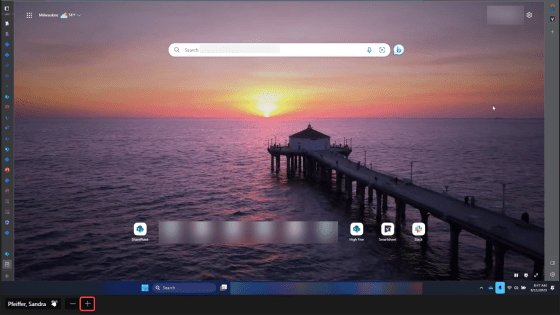
Have you ever been watching someone share their screen, and you’ve struggled to see the detail as everything is tiny. Well, now in Microsoft Teams, you can zoom in during a screen share and magnify the parts that need more definition. Here’s how that works…
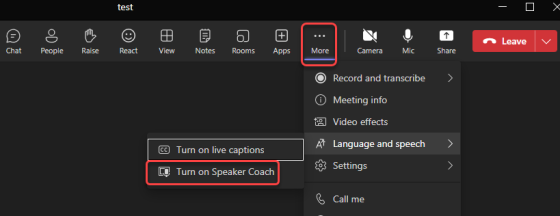
The fear of public speaking is real, and when you’re nervous it can make for an unpleasant experience for both you and the attendees. Wouldn’t it be nice to get some free coaching on your speaking style? Now in Microsoft Teams, you can! The Speaker Coach will give you real-time feedback when you’re presenting, as well as providing a post-meeting assessment of your effort. Here’s how that works…

Episode 180 of the Microsoft 365 Pulse Roadmap webcast is now out on YouTube. Join Tamara Bredemus, Jennifer Mason, and myself as we cover this week’s updates.
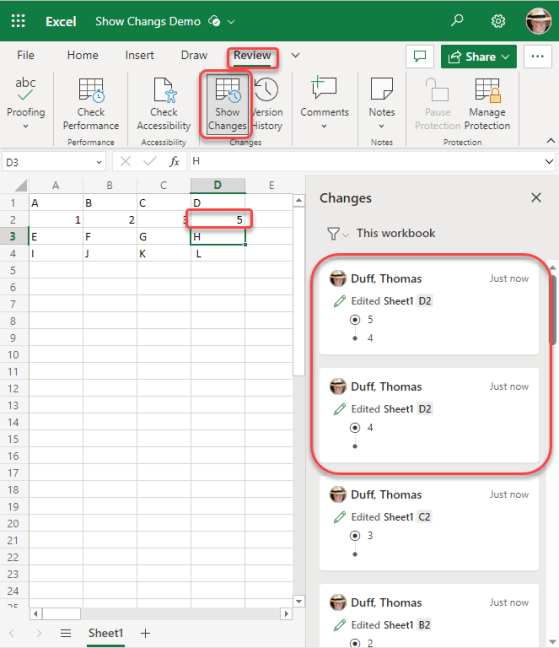
Sandra found a cool new feature yesterday that works in the browser-based version of Excel. It’s called Show Changes, and it’s like having a step-by-step version history of everything in your spreadsheet. Here’s what it looks like…
 One Minute Office Magic