Expanded view of the profile card in Microsoft Teams

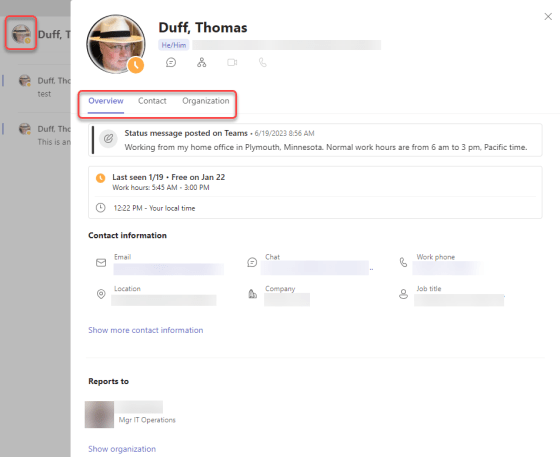
Microsoft has been working to provide more information on the Profile Card that appears if you click on someone’s picture in various Microsoft 365 applications. But while Outlook had the expanded Profile Card that showed the most information, Microsoft Teams wasn’t up to the same level. Now, you can click on a person’s profile picture in Teams and get the same expanded profile information that you’d find in Outlook. Here’s what it looks like…

Sending personal invites to a Teams channel meeting to everyone in that Team

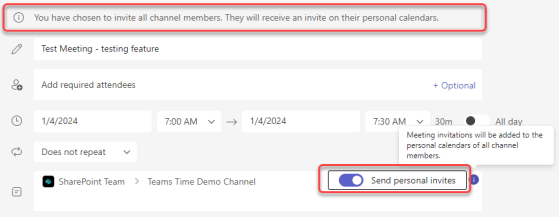
While I love using Microsoft Teams channel meetings, it’s always been a hassle to make sure the invites get to everyone associated with that Teams space. If you have a lot of members in the Team, you either had to use a workaround to get an email address for everyone, or you had to maintain a separate distribution list. That’s now a thing of the past… you can use the Send Personal Invites feature! Here’s how that looks…

Domain-specific searching in Microsoft Teams

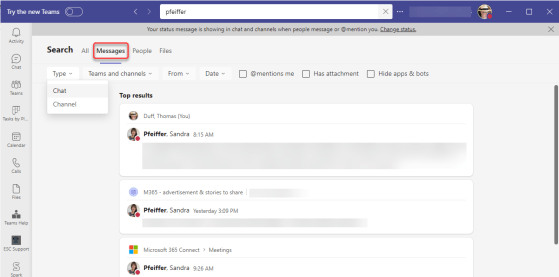
While you’ve been able to get search results in Microsoft Teams, you often got WAY more results than you wanted, and it was hard to narrow things down. Now with domain-specific searching, you can narrow down your search results in much the same way you narrow down search results in Microsoft 365. Here’s how that works…

Animated Backgrounds in Teams Meetings

Microsoft Teams has rolled out a new feature that will probably make some people smile, and others unhappy. I’m not sure which one I am yet. It’s the ability to have animated backgrounds when you use your video camera in a Teams meeting. Before you run off and grab your favorite Star Trek warp speed video background, read on for the restrictions and cautions…

Using Speaker Coach in Microsoft Teams

The fear of public speaking is real, and when you’re nervous it can make for an unpleasant experience for both you and the attendees. Wouldn’t it be nice to get some free coaching on your speaking style? Now in Microsoft Teams, you can! The Speaker Coach will give you real-time feedback when you’re presenting, as well as providing a post-meeting assessment of your effort. Here’s how that works…

Exporting Microsoft Teams wikis to OneNote

As if there are not enough migrations going on already… Microsoft has deprecated the Wiki application in Microsoft Teams, and you will need to export the contents of your standard channel wikis to the OneNote application that is part of your Microsoft Teams space. Fortunately, there is a tool that will do that export for you. Here’s how to make that happen…

Microsoft Teams Compact Chat settings have been improved!

Microsoft Teams came out with a “compact” chat setting some time back, and it reduced the amount of white space between messages. However, I really didn’t like it as the time-stamp of the message didn’t display unless you hovered over it, and it was on the far side of the page. The recent changes to compact chat have fixed that and also hidden the message previews you see in the chat list. Here’s what that looks like…