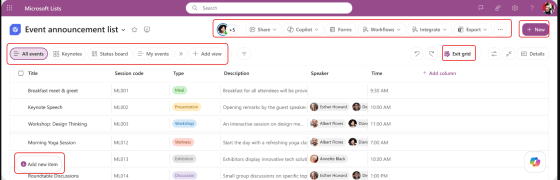
Normally, I don’t put out a tip on an item that hasn’t hit tenants yet. But this is a “they moved my cheese” type of change, and I want to make sure you have a heads-up before it shows up in mid-December with no warning. Microsoft is making a change to the user experience in Microsoft Lists. It’s mostly a case of just moving things around (no real functionality changes), and here’s what you will likely see…
Category: Microsoft Lists
Microsoft Lists: Mobile apps for iOS and Android will retire
This seems to be a theme of late… Microsoft retiring features and applications for various reasons. The latest retirement is the Microsoft Lists mobile application in iOS and Android, and it’ll be completely shut down by mid-November, 2025. There is no reason listed as to why, but I’m going to guess that the mobile app for Microsoft Lists never really gained the traction they expected when they released Microsoft Lists as a whole. To be clear, this doesn’t affect Microsoft Lists in general… only the ability to access and use it on the mobile app.
Here’s the information provided by Microsoft:
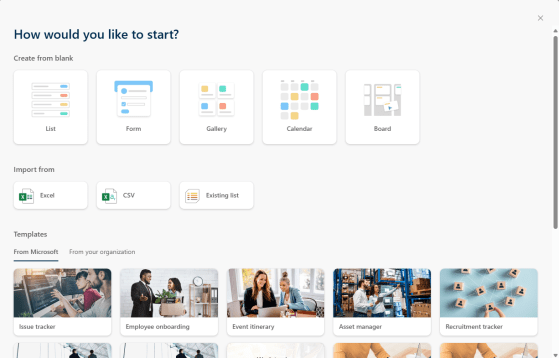
Getting a jumpstart on a Microsoft List using templates
Back in the olden days, creating a new list in a SharePoint site was pretty much a case of naming a bare-bones new list and then starting to build out the list, field by field. Heaven help you if you needed some ideas on what to do to set up a list like an issue tracker… However, Microsoft has really improved the process of starting a new list by the use of templates! Here’s what that looks like…
Seeing who else is looking at your list in Microsoft Lists
If you’re in a Microsoft modern list, there’s a cool feature you may not have noticed. In the upper-right corner, you can see who else might be using that list at the same time you are. This is how that looks…
Using the new Forms feature in Microsoft Lists
Today we had a bit of a surprise in that the new Forms feature in Microsoft Lists showed up. At first you had to be in the Microsoft Lists experience, but now it seems to be showing up on all your modern SharePoint lists that you access via SharePoint. I’m going to explain a bit about how it works, and why I think you should hold off a bit before committing to this path…
Seeing (and clearing) applied filters in a Microsoft list
We just had this new feature roll out in our SharePoint tenant, and it’s pretty cool. When you filter your view on column values, you will now see what the filters are at the top of the view, as well as a button to clear all the filters at once! Here’s what it looks like…
Creating a Board View in a SharePoint list
This is a new feature that I’ve been waiting for, and Sandra found that it hit our tenant the other day! You can now create a Board View for a SharePoint list. Imagine having a kanban-style view where you can drag and drop items between columns and have the status update automatically. Here’s how it works…
Turning off comments in Microsoft Lists
Back in July, Microsoft added the ability to include comments on Microsoft list items. While I like the idea of being able to comment on list content, it may be something that doesn’t work well for certain styles of work or list content. To remove that distraction or avoid overlooking comments, you can turn off comments in a list. Here’s how you do that…
Using @mentions in Microsoft List comments
he addition of commenting in a list item was a great addition to Microsoft Lists, but it wasn’t easy to know when a particular comment might need your attention. That’s been addressed with the ability to use @mentions in a comment so that the person mentioned will get notified. This is how that works…