Have you ever sat in front of a blank SharePoint page and struggled to get even the barest amount of content on the screen? With Copilot, you can prompt your way to a starting design and content, and then refine things based on what it provides you. Here’s how that works…
Author: oneminuteofficemagic
Using the new Editorial Card web part on SharePoint pages
Microsoft has come out with a new SharePoint page web part that is rather interesting. It’s called an Editorial Card web part, and Microsoft describes it as “The SharePoint Editorial Card web part is a new feature designed to enhance content presentation on SharePoint pages and news. It allows for manual customization, enabling users to create visually appealing card-like containers tailored to specific needs.” Let’s dive in to see what it looks like and how it works…
Using the new Carousel option in the SharePoint page Hero web part
If you’ve been creating SharePoint pages for some time, you’re likely familiar with the Hero web part. It displays up to five tiles at the top of the page, and it allowed you to have the tiles laid out in a grid or layered down the page. Microsoft has added a new Carousel option for the Hero web part layout, and you might find it interesting to check out. Here’s how it works…
Microsoft 365 Pulse Roadmap webcast – Episode 244
Episode 244 of the Microsoft 365 Pulse Roadmap webcast is now out on YouTube. Join Tamara Bredemus, Adam Ochs, and Thomas Duff as we cover this week’s updates.
Categorize single items in conversation view in Microsoft Outlook for the web
If you’re a categorizer of emails in Outlook, you probably found it frustrating in Outlook on the web in that you couldn’t categorize a single email in a conversation thread. It would categorize everything in the thread. Now, you have the ability to pick and choose exactly what you want to have categorized in the conversation. Here’s how that looks…
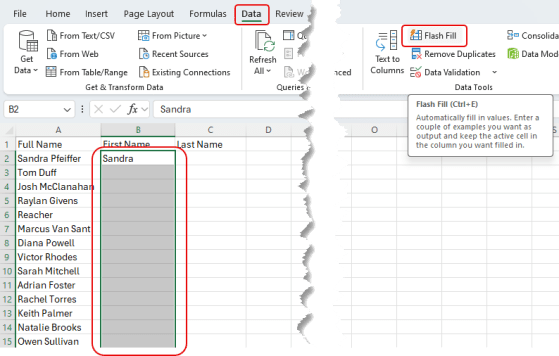
Using Flash Fill in Excel
Have you ever had a column of data in Excel (like full names) and wanted to split out the first name into one column and the last name into another? Furthermore, are you less than adept when it comes to formulas in Excel? Perhaps the Flash Fill feature can be your knight in shining armor! Here’s how that works…
Microsoft 365 Pulse Roadmap webcast – Episode 243
Episode 243 of the Microsoft 365 Pulse Roadmap webcast is now out on YouTube. Join Jennifer Mason, Tamara Bredemus, and Thomas Duff as we cover this week’s updates.
Changes to the Focal Point feature in SharePoint page banners
When you put an image in a SharePoint page banner, you have the ability to change the focal point of how the image is positioned. But you only see a narrow slice of the image, and you have to drag the focal point around without really seeing the full image content. The focal point feature has now changed, and you see the entire image when you’re selecting a focal point. That makes it a lot easier to get the effect you want, and here’s how that looks and works…
Updated retention policy for Microsoft Teams meeting attendance reports
It’s possible this is something you’ve never given much thought to, but the attendance reports in Microsoft Teams meetings currently are stored indefinitely. However, Microsoft has made a policy change and now the attendance report for a Teams meeting will have a one-year retention period. Following is the Microsoft notice for this change, and what you’ll need to do in order to retain attendance reports prior to November 1st, 2024…