By default, a Microsoft Teams meeting has a single organizer that can handle all the meeting settings. But there are times when you will want to have a co-organizer who can also do things if you’re not available. I would suggest that you might ALWAYS want to have one unless it’s a very small meeting. Here’s how you can set that up…
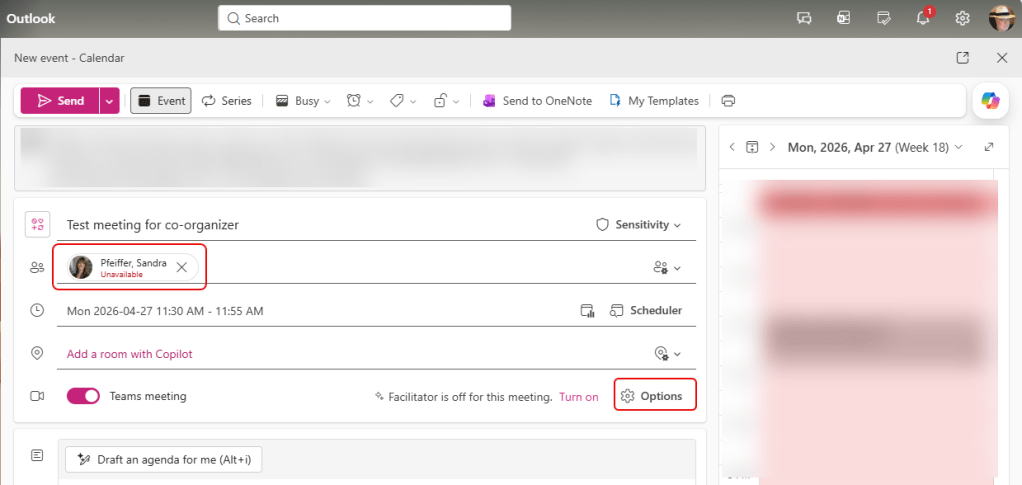
When you’re setting up a meeting, add at least one attendee. Then click on the Options setting:
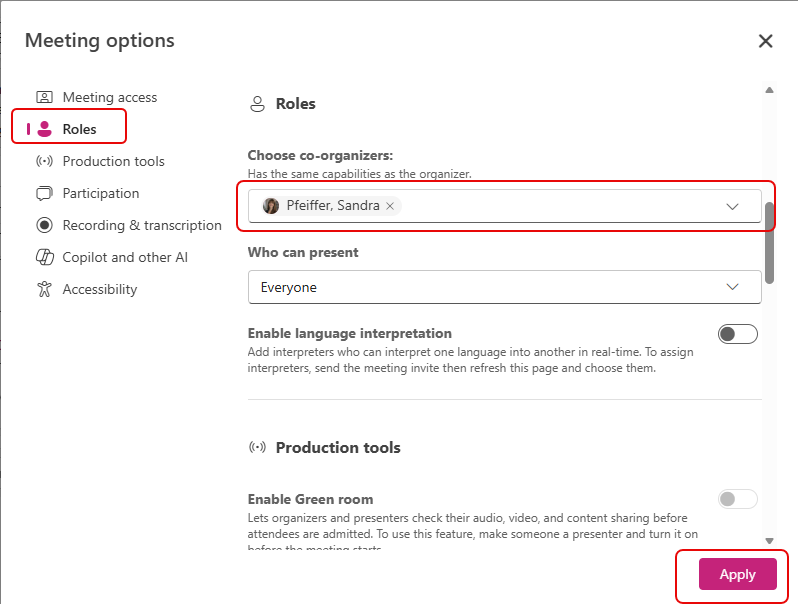
Select the Roles option, select one of the names for choosing a co-organizer, and then click Apply:
That person is now the co-organizer in your meeting. A co‑organizer can perform most of the same administrative tasks as the main organizer, such as starting/stopping the meeting, locking it, changing settings, managing breakout rooms, and moderating participants. This reduces the burden on a single person and allows for better delegation.


