It’s not unusual for a SharePoint site to be focused on a particular project with an upcoming deadline, and it would be nice to see how much time is remaining before the deadline. You can do that with a Countdown Timer web part on your SharePoint page. Here’s how you set that up and how it looks…
Tag: SharePoint Online
Using the Image Gallery web part on a SharePoint page
It’s not uncommon to have a SharePoint page that celebrates some gathering or holiday celebration. You have a lot of pictures of the event, and you’re wondering how best to share those on a SharePoint page. Look no further than the Image Gallery web part. Here’s how that works…
Using the Spacer web part on SharePoint pages
This was a thing I don’t think I had ever noticed until Sandra pointed it out to me recently. There’s a way you can add vertical white space in a SharePoint page section without resorting to line feeds in a Text web part. You can use the Spacer web part for a precise level of control. Here’s how it works and looks…
Improved table formatting in a SharePoint text web part
When you use the Text web part in a SharePoint page, the Table option in the web part has improved formatting and accessibility options. Here’s what they look like…
Using Layers in the Hero web part in SharePoint pages
If you’ve created SharePoint pages, you’ve probably used the Hero web part to display up to five windows of content. But Sandra showed me a variation of the Hero web part that I’ve never noticed before… layers! Layers gives you a different layout and the opportunity to have more context in each of the areas. Here’s how that works and looks…
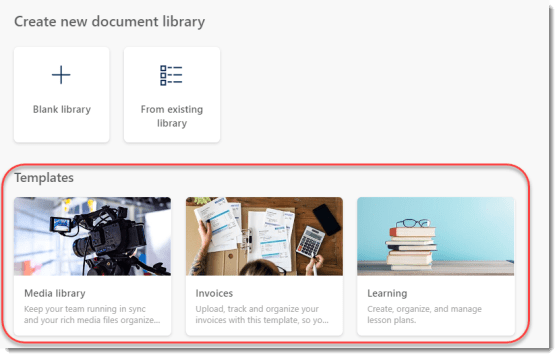
New document library templates for SharePoint Online
Up to now, creating a new document library in a SharePoint Online site was something that was “bare bones” in nature. You had a couple of basic fields, and you had to build any additional metadata fields on your own. Now, Microsoft gives you some options in terms of document library templates you can choose from. These may be a good starting place for you when building out a new process. Here’s what they are…
The Stream Web Part for Stream on SharePoint and OneDrive
Now that Stream Classic is in its waning days, you will need to start using the new Stream web part on SharePoint pages. This Stream web part works for videos that are stored on SharePoint and OneDrive sites. Here’s how it works…
Text Overlay options for images in SharePoint Online
A Microsoft 365 colleague posted a short while back about some new options for adding text overlays to images on a SharePoint Online page. These provide some interesting options for adding text to an image without having to necessarily use an image processing tool. Here’s how it works…
Opening Quick Links in a new window
This has been a long time coming… 🙂 When using the Quick Links web part in a SharePoint Online page, you can now set whether the associated link should open in a new tab! Here’s how that works…