Have you ever been editing a SharePoint page and wished that you could have someone else working on it at the same time so that you could collaborate? Now you can with the new ability to be editing a SharePoint page or news post at the same time. Here’s how that looks and works…
Tag: Pages
Using the new Editorial Card web part on SharePoint pages
Microsoft has come out with a new SharePoint page web part that is rather interesting. It’s called an Editorial Card web part, and Microsoft describes it as “The SharePoint Editorial Card web part is a new feature designed to enhance content presentation on SharePoint pages and news. It allows for manual customization, enabling users to create visually appealing card-like containers tailored to specific needs.” Let’s dive in to see what it looks like and how it works…
Using the new Carousel option in the SharePoint page Hero web part
If you’ve been creating SharePoint pages for some time, you’re likely familiar with the Hero web part. It displays up to five tiles at the top of the page, and it allowed you to have the tiles laid out in a grid or layered down the page. Microsoft has added a new Carousel option for the Hero web part layout, and you might find it interesting to check out. Here’s how it works…
Changes to the Focal Point feature in SharePoint page banners
When you put an image in a SharePoint page banner, you have the ability to change the focal point of how the image is positioned. But you only see a narrow slice of the image, and you have to drag the focal point around without really seeing the full image content. The focal point feature has now changed, and you see the entire image when you’re selecting a focal point. That makes it a lot easier to get the effect you want, and here’s how that looks and works…
Removing the Header section from a SharePoint page
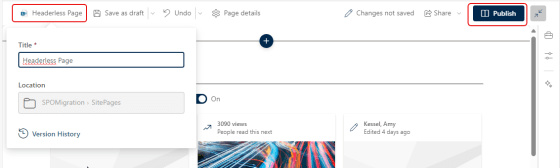
This is a good tip that Sandra sent my way today… Have you ever wanted to create a SharePoint page that didn’t have the normal page header at the top? It had been possible with using some hacks and workarounds, but now you can do it as part of editing your page in the browser. Here’s how that works…
Using the new Fade Banner on SharePoint pages
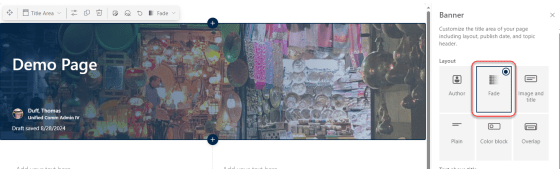
There’s also one other new SharePoint page banner… it’s called Fade. It’s not as impressive as the new Author banner type, but it’s worth knowing about. Here’s how it works and looks…
Using the new Author Banner on SharePoint pages
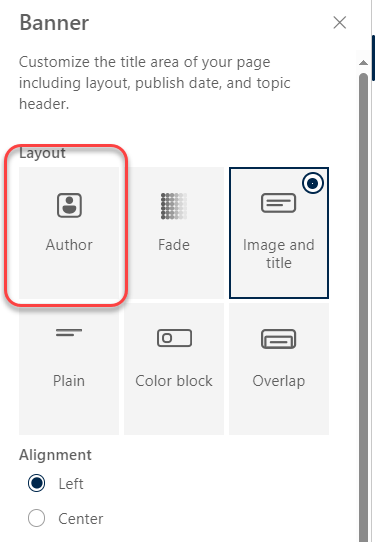
When Sandra was sharing some new features with me, she happened to stumble across this new addition to the SharePoint page banners… the Author banner! This looks really slick, and is great for pages that want to make the author of the page more evident. Here’s how it works and looks…
New SharePoint Page Section Backgrounds
If you’ve built SharePoint pages, you are probably familiar with the four background colors you could use in the sections of your pages. But now, you also have a choice of twelve additional colors/images that you can use. Here’s what they look like and how they work…
Page Text Toolbar updates in SharePoint Online
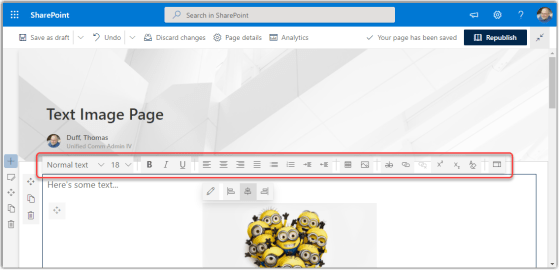
When working with SharePoint Online modern pages, you used to get only a limited number of options in the Text web part toolbar. To get the whole list of options, you had to open the Properties pane on the right side of the page. Now, you can access all the text properties from the toolbar. Here’s how that looks…