When you’re having a group or one-on-one chat with someone in Microsoft Teams, you may get to a point where having an actual meeting is necessary. Here’s an easy way to create that meeting that automatically invites everyone in the chat…

Learning new Microsoft Office tricks in "just a minute"
When you’re having a group or one-on-one chat with someone in Microsoft Teams, you may get to a point where having an actual meeting is necessary. Here’s an easy way to create that meeting that automatically invites everyone in the chat…

When you want to make an announcement in a Microsoft Teams channel, it’s always nice to have an eye-catching image to get the attention of the reader. But if you’re like me, you spend FAR too much time trying to find just the right image. Now you can let Designer create a great announcement image for you! Here’s how that works…
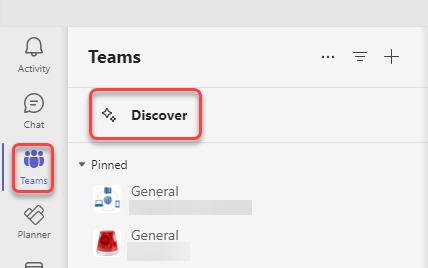
If you have a large number of Teams spaces that you are part of, it can be difficult to keep track of everything that’s going on in the various Teams. To make things a bit easier, you might want to check out the Discover feed in Teams. Here’s what it looks like and how it works…

If you’re part of a group chat in Microsoft Teams, you’ll notice that the icon for that chat is a mix of three profile pictures of the group participants. But it would be nice if you could change that icon to be more representative of the group… or perhaps just more fun. Well, now you *can* change that picture, and here’s how you can do it…

If your Microsoft Teams space has a number of channels, you may have wished for a way to archive one or more of those channels without physically deleting them permanently. Now you can! Each channel in a Teams space has an archive option. Here’s what it looks like and how it works…

It used to be that Microsoft Teams had separate icons for adding emojis, GIFs, and stickers to your chats and conversations. But now those three features have been combined into a single icon to select them. Here’s what that looks like and how it works…
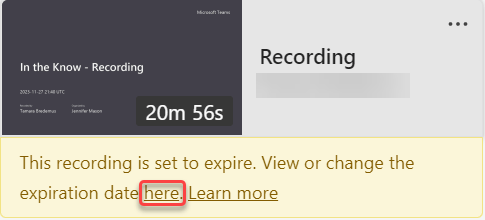
In Microsoft Teams, there is a policy setting that controls the auto-expiration of Teams meeting recordings. Microsoft has stated that over 99% of videos are never viewed after 60 days, and they take up storage that you pay for as an organization. However, there are videos that you may need to retain for various purposes, such as training classes. Here’s how you can change the retention period for a Teams meeting after the recording has been processed.
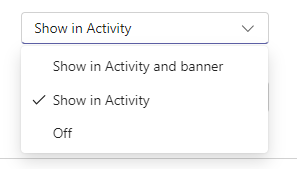
In the new Microsoft Teams, there’s a feature to have any calendar invites, updates, and cancellations show up in your Activity Feed. However, you might find that it adds a lot of clutter to your feed, making it harder to find the things that are more important. Here’s a way to shut down those calendar notifications so that your Activity Feed won’t get those posts…

 One Minute Office Magic