Episode 264 of the Microsoft 365 Pulse Roadmap webcast is now out on YouTube. Join Tamara Bredemus and Thomas Duff as we cover this week’s updates.

Learning new Microsoft Office tricks in "just a minute"
Episode 264 of the Microsoft 365 Pulse Roadmap webcast is now out on YouTube. Join Tamara Bredemus and Thomas Duff as we cover this week’s updates.
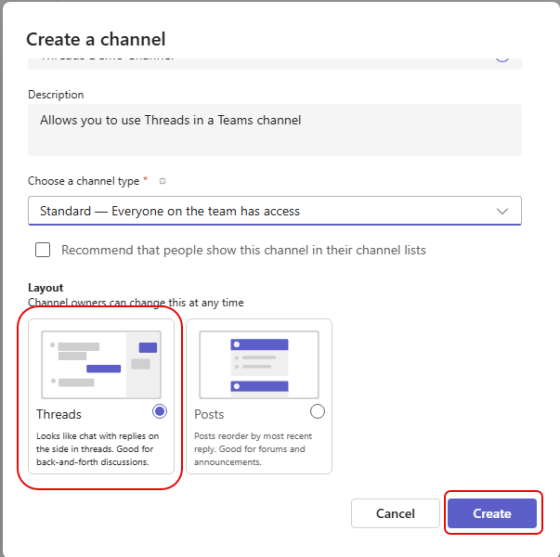
When you’re working in a busy Teams channel with multiple people responding to multiple posts, it can get hard to follow and/or scroll through what is going on. Microsoft has a new formatting option for Teams channels called Threads. It enables you to respond to a post with replies that do not clutter up the main screen, and appear in a separate Threads panel. Here’s how that works and looks…
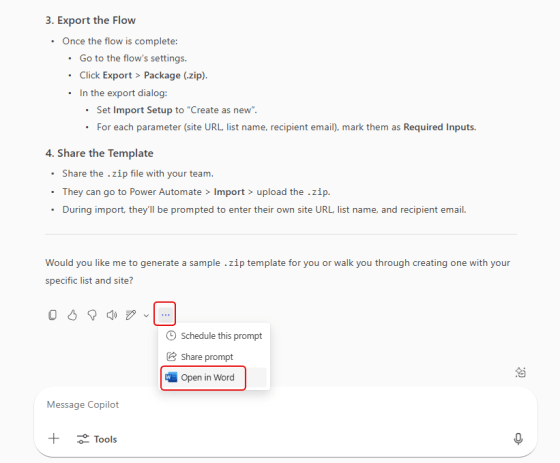
When you’re using agents like Researcher in Microsoft Copilot, you can end up with a LOT of output… pages of it. It’s likely that you’ll want to put that into a file like a Word document, but just doing copy and paste may lose some of the formatting and fidelity. An easy way to get that into Word is to use the Open In Word option. Here’s what that looks like…
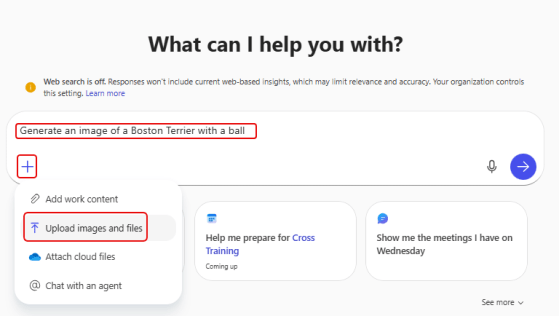
When you’re on the Copilot home page, you can prompt it to give you an image that you can use for your project or page. But as with all prompts, you may not give it enough context or information to get what you want. One way to fix that is to provide a reference image in your prompt. Here’s what that looks like…

Episode 263 of the Microsoft 365 Pulse Roadmap webcast is now out on YouTube. Join Tamara Bredemus and Thomas Duff as we cover this week’s updates.

Microsoft has decided to retire the Microsoft Lens app that you could use with your Android and iOS devices. You might be wondering “what was Lens?” It was a really cool app that allowed you to “scan” (take pictures) of documents (like receipts) and they would be saved to the application. It was much better than having to scan receipts using a copier or printer. Here’s the information related to the retirement…

Episode 262 of the Microsoft 365 Pulse Roadmap webcast is now out on YouTube. Join Tamara Bredemus and Thomas Duff as we cover this week’s updates.

If you have multiple PDF files stored in OneDrive that you’d like to have merged into a single PDF file, you don’t have to look for third party software to make that happen. You can do it with the Merge function in OneDrive on the web. Here’s how that works…

Have you ever had a PDF file where you’d like to extract certain pages to create a new PDF file, but you don’t have any software (that you know of) that would allow you to do that? Now you do! You can use OneDrive on the web to open up a PDF file and extract selected pages to make a new PDF file. Here’s how that works…
 One Minute Office Magic