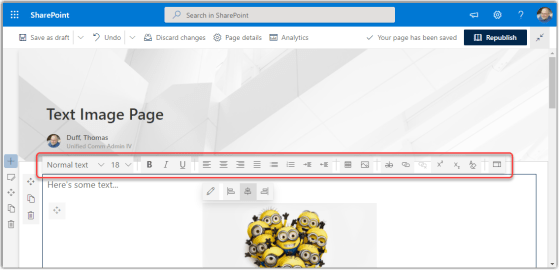
When working with SharePoint Online modern pages, you used to get only a limited number of options in the Text web part toolbar. To get the whole list of options, you had to open the Properties pane on the right side of the page. Now, you can access all the text properties from the toolbar. Here’s how that looks…
Microsoft 365 Pulse Roadmap webcast – Episode 116
Episode 116 of the Microsoft 365 Pulse Roadmap webcast is now out on YouTube. Join Jennifer Mason, Tamara Bredemus, and…
Microsoft 365 Pulse Roadmap webcast – Episode 115
Episode 115 of the Microsoft 365 Pulse Roadmap webcast is now out on YouTube. Join Tamara Bredemus, Adam Ochs, and…
Microsoft 365 Pulse Roadmap webcast – Episode 114
Episode 114 of the Microsoft 365 Pulse Roadmap webcast is now out on YouTube. Join Jennifer Mason, Tamara Bredemus, Adam…
Microsoft 365 Pulse Roadmap webcast – Episode 113
Episode 113 of the Microsoft 365 Pulse Roadmap webcast is now out on YouTube. Join and myself as we cover this week’s updates.
Microsoft 365 Pulse Roadmap webcast – Episode 112
Episode 112 of the Microsoft 365 Pulse Roadmap webcast is now out on YouTube. Join Tamara Bredemus and myself as…
Microsoft 365 Pulse Roadmap webcast – Episode 111
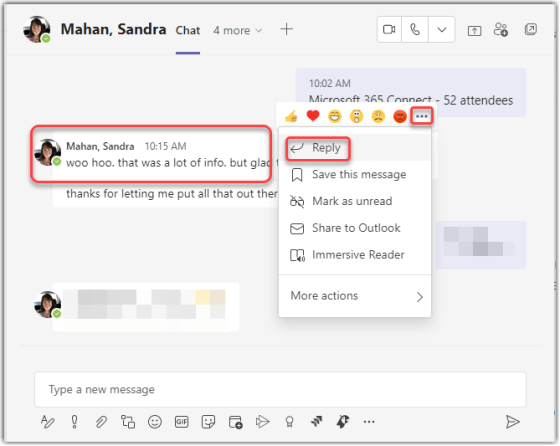
Reply to specific chat messages in Microsoft Teams
have lost the context behind your latest chat entry. Teams now has a feature that allows you to reply to a specific chat entry and keep the context of what you’re responding to. Here’s how that works…
Tone detection in Microsoft Editor for Outlook on the Web
Writing an email in a business environment is vastly different than jotting off a quick note to your best friend about having lunch next week. You need to keep many things in mind these days, such as inclusiveness, formality, and clarity. In order to help you out, you can use Microsoft Editor in Outlook on the Web to get grammar suggestions and hints that can make your writing better suited to your style and environment. Here’s how it works…