Episode 130 of the Microsoft 365 Pulse Roadmap webcast is now out on YouTube. Join and myself as we cover this week’s updates.
Learning new Microsoft Office tricks in "just a minute"
Episode 130 of the Microsoft 365 Pulse Roadmap webcast is now out on YouTube. Join and myself as we cover this week’s updates.

It’s so frustrating when you do Ctrl+C to copy some text, and when you paste it into something like an email, it copies over all the text formatting too. So you head over to Notepad to paste it there (to lose the formatting), and then you copy and paste it into something like Outlook or Teams to get just the text. Today I learned that you can use Ctrl+Shift+V (or Option+Shift+Command+V on a Mac) to paste over content without formatting! Here’s how that works…
Episode 129 of the Microsoft 365 Pulse Roadmap webcast is now out on YouTube. Join Jennifer Mason, Adam Ochs, Tamara Bredemus, and myself as we cover this week’s updates.
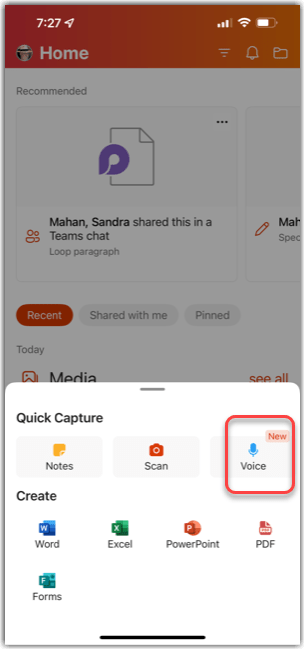
If you’re set up to use your mobile device to access work-related Microsoft 365 content (via Mobileiron), there’s a new feature in the Office mobile app on your iOS or Android device. This feature allows you to create quick voice notes to yourself, and you also get it translated to text! Here’s how it works…
Episode 128 of the Microsoft 365 Pulse Roadmap webcast is now out on YouTube. Join Jennifer Mason, Adam Ochs, Tamara Bredemus, and myself as we cover this week’s updates.

My wife Tamara learned this Microsoft Teams tip, and it’s pretty cool…
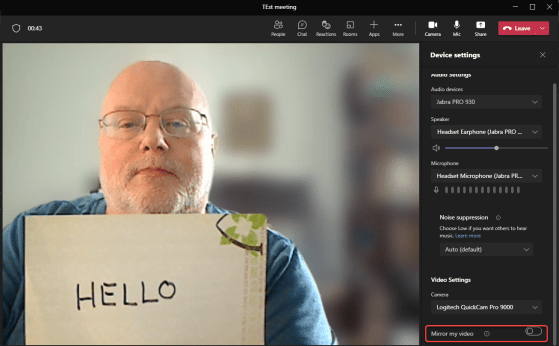
When you’re using your camera in a Microsoft Teams meeting, you may end up with a “mirroring” effect on your screen. Everyone viewing your video sees things correctly, but you see everything backwards… like looking in a mirror. Teams has a feature to correct that if necessary. Here’s how that works…
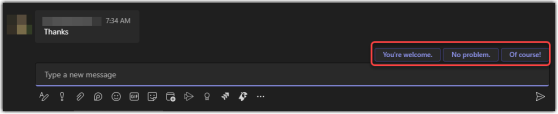
When you’re in a Teams chat, sometimes the response to someone just needs to be a short phrase like “thank you” or “no problem”. Teams now has a new feature that will auto-suggest three replies that you can use with a single click. Here’s how it works…
Episode 126 of the Microsoft 365 Pulse Roadmap webcast is now out on YouTube. Join Adam Ochs, Tamara Bredemus, and myself as we cover this week’s updates.
 One Minute Office Magic