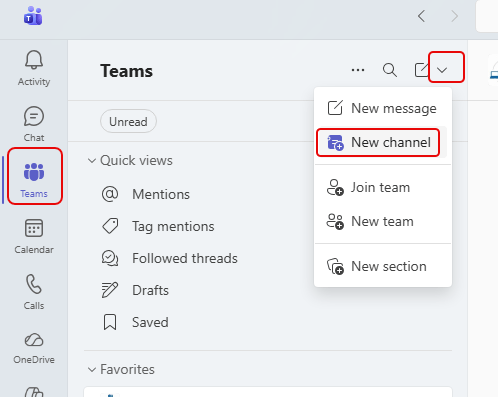
When you’re trying to add a new channel into a Teams workspace, it can be a bit confusing to find the options if you don’t do it regularly. If you add channels this way, it’s WAY too easy. 🙂 Here’s how it works…
Learning new Microsoft Office tricks in "just a minute"
When you’re trying to add a new channel into a Teams workspace, it can be a bit confusing to find the options if you don’t do it regularly. If you add channels this way, it’s WAY too easy. 🙂 Here’s how it works…
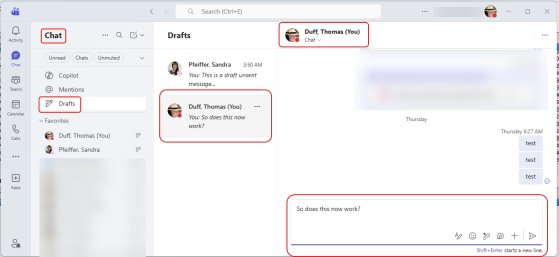
Admit it… this has happened to you more than once… You’re responding to a chat message or a channel post in Microsoft Teams, and before you hit enter to send your message… SQUIRREL! And do you remember to go back and send it? (no) And do you wonder why no one responded to you? (yes). Now with the Drafts Quick View, you can find all those partially completed Draft messages than never got sent! Here’s how that works…
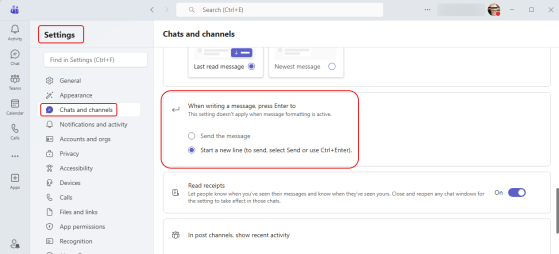
This is a change I’ve been waiting for… for a VERY long time! Have you been in a Teams chat, started typing something, and inadvertently hit the Enter key? And of course, off goes the partial chat and you have to quickly fill in the rest of it. Now, you have a chance to update you settings to determine what the Enter key does when it comes to Teams chat messages. Here’s how that works…
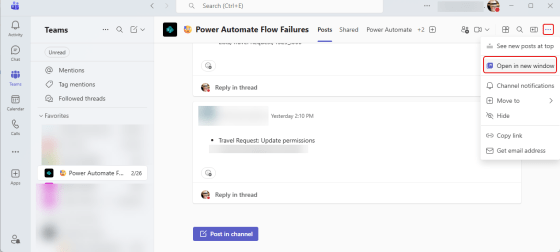
Have you ever had a Microsoft Teams channel that is VERY active, and it’s hard to keep up with what’s going on without a lot of clicking back and forth? Now, Microsoft is allowing you to open a channel into a separate window! Here’s how that works…

If you’re a Microsoft Teams user, you have (at some point) ended up with some poor network performance in a Teams meeting or call. But in the middle of what you’re trying to do, you don’t always have a way to tell if it’s you or the other person. Now, Teams provides a Network Strength indicator that can help you do some initial troubleshooting. Here’s what that looks like…
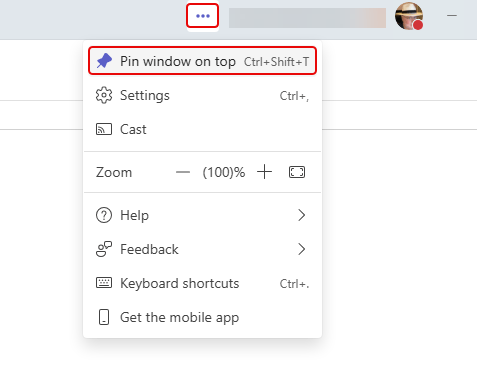
This is something I’ve never noticed before, and I can see it confusing someone if it gets set inadvertently. You can pin your Microsoft Teams window on top of everything on your screen. That means that anything you launch on that screen is “invisible” until you minimize your Teams window. Here’s what that looks like and how to change the setting…
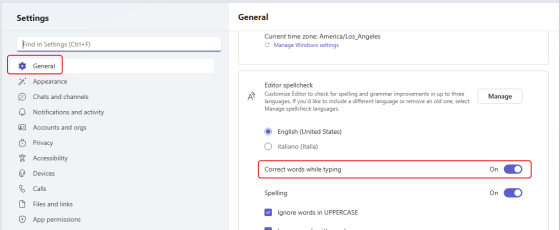
In many of the Microsoft 365 applications like Word or OneNote, autocorrecting a misspelled word is something you’ve come to expect. Microsoft Teams has been an outlier in that it will flag a misspelled word but it won’t correct it. Microsoft is currently rolling out a change that *will* actually autocorrect commonly misspelled words for you. However, it seems to be not-quite-ready-for-prime-time, but I want you to know what you’re looking at when you see it. Here’s how it looks and (sort of) works…
 One Minute Office Magic