Microsoft Lists: Mobile apps for iOS and Android will retire

This seems to be a theme of late… Microsoft retiring features and applications for various reasons. The latest retirement is the Microsoft Lists mobile application in iOS and Android, and it’ll be completely shut down by mid-November, 2025. There is no reason listed as to why, but I’m going to guess that the mobile app for Microsoft Lists never really gained the traction they expected when they released Microsoft Lists as a whole. To be clear, this doesn’t affect Microsoft Lists in general… only the ability to access and use it on the mobile app.

Here’s the information provided by Microsoft:
Getting a jumpstart on a Microsoft List using templates

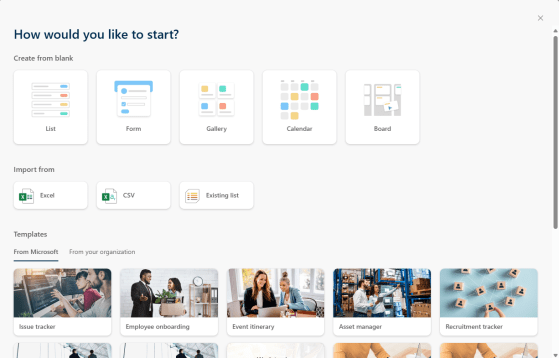
Back in the olden days, creating a new list in a SharePoint site was pretty much a case of naming a bare-bones new list and then starting to build out the list, field by field. Heaven help you if you needed some ideas on what to do to set up a list like an issue tracker… However, Microsoft has really improved the process of starting a new list by the use of templates! Here’s what that looks like…

Using the new Forms feature in Microsoft Lists

Today we had a bit of a surprise in that the new Forms feature in Microsoft Lists showed up. At first you had to be in the Microsoft Lists experience, but now it seems to be showing up on all your modern SharePoint lists that you access via SharePoint. I’m going to explain a bit about how it works, and why I think you should hold off a bit before committing to this path…

Turning off comments in Microsoft Lists

Back in July, Microsoft added the ability to include comments on Microsoft list items. While I like the idea of being able to comment on list content, it may be something that doesn’t work well for certain styles of work or list content. To remove that distraction or avoid overlooking comments, you can turn off comments in a list. Here’s how you do that…

Using @mentions in Microsoft List comments

he addition of commenting in a list item was a great addition to Microsoft Lists, but it wasn’t easy to know when a particular comment might need your attention. That’s been addressed with the ability to use @mentions in a comment so that the person mentioned will get notified. This is how that works…
