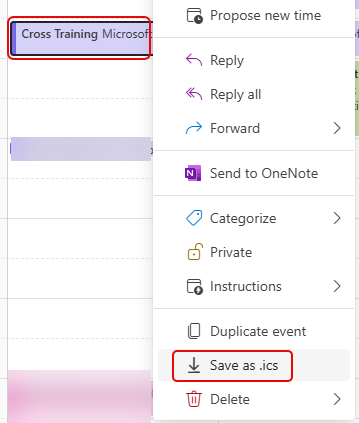
I just found a new option this morning in the Outlook calendar (for New Outlook and Outlook on the web) that makes it SO easy to create a .ics file for a calendar entry. If you don’t know, a .ics file is a link to add a calendar entry to your own Outlook calendar. The .ics file has been around forever, but creating one can be cumbersome. Now it’s a simple right-click option. Here’s how it works…
Using either New Outlook or Outlook on the web, right-click a calendar entry to get the pop-up list of options. Near the bottom of the list, you’ll see Save as .ics. Click that and Outlook will create the .ics file and download it to wherever your downloaded files go:
You can then use that file in an email or a web page to allow people to add that calendar entry to their Outlook calendar. SO much easier than prior methods to create .ics files.


