Many of you might be used to (or hated) how chat messages in Microsoft Teams would provide a short message preview in the notification pop-up. Sometimes that can be rather embarrassing if someone sees your pop-up and the short preview… “raises questions”. This is a heads-up to let you know that if you have that feature turned on, Microsoft is now doing message previews for channels, mentions, and reactions. Here’s how you can work around that…
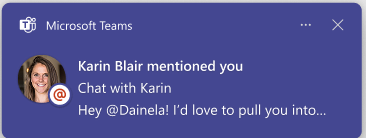
If you’re unfamiliar with what a message preview looks like in a notification pop-up, here’s an example:
As I mentioned above, this feature now applies to channels, mentions, and reactions in addition to regular chats.
If you don’t want that to show up in your Teams client, you can go to the Teams Settings under Notifications and activity. Within the Display section, you can turn off (or on) the Show messages and content previews in notifications:
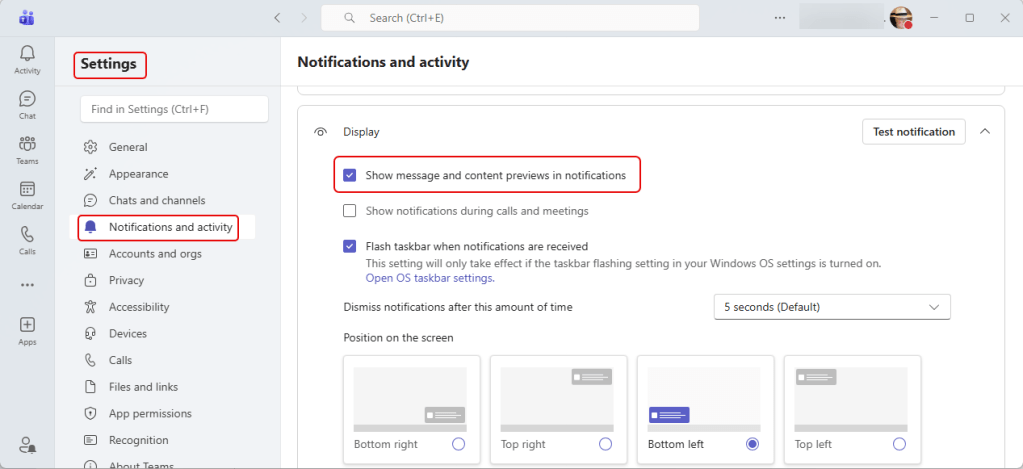
If you like to see message previews but don’t want others to see them on your calls and meetings, you can always turn off the Show notification during calls and meetings option. That way you can keep your notifications without embarrassing info showing up when you’re sharing your screen.

 One Minute Office Magic