With all the chats and channels you are part of in Microsoft Teams, you may have a lot of trouble trying to flag individual items you want to come back to. You can leave them as Unread, but that’s rather cumbersome. Now you can mark an individual message with the Saved indicator, and then navigate to all the items you have saved. Very convenient! Here’s how that works…
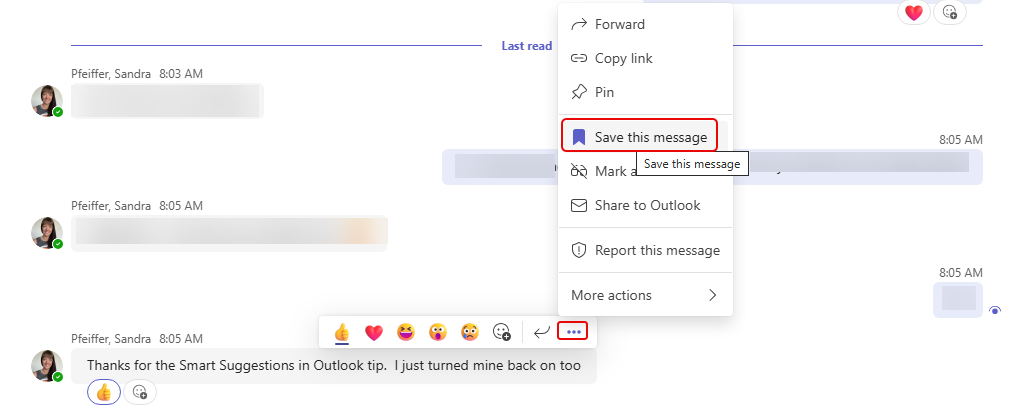
Here’s a message from Sandra that I want to come back to at some point. I click the ellipsis for the message and select Save this message:
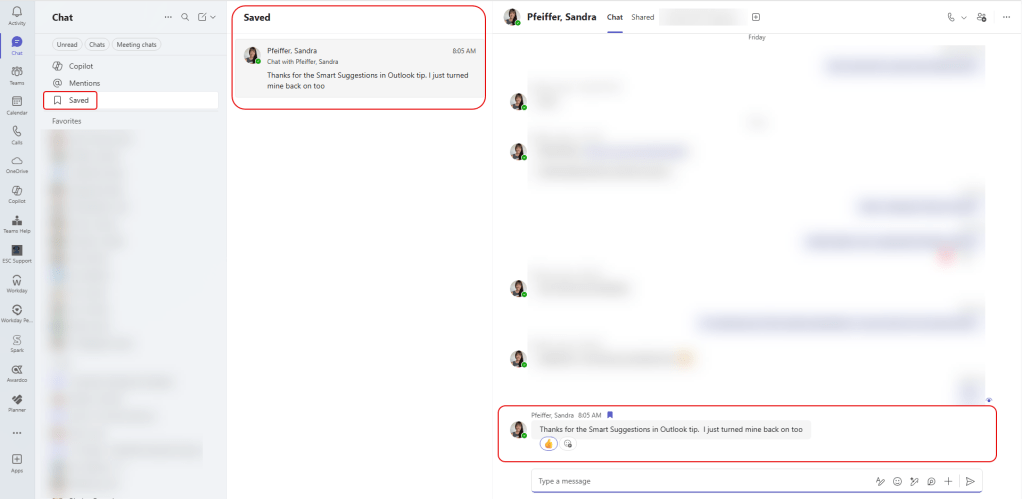
I see that the message shows the Saved icon next to it:

Now… I go to the Activity area in Teams and I see a new area labeled Saved. Everything that I have saved will appear, and if I click on an entry, it’ll take me to the actual chat or conversation that has the saved message:
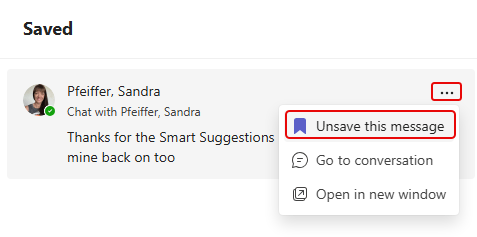
Once I am done with that message, I can click on the ellipsis and Unsave this message so that it goes away:
This feature is a great way to stay on top of things in Teams!

 One Minute Office Magic
Note that this feature will be removed in October 2025 for EDU Mobile users as per MC1130608.
LikeLike
Good to know.
LikeLike