It used to be when you’d share a file in SharePoint or OneDrive, that link was valid until such time as you removed the person from the access to the file. Now you can simply set an expiration date on the link, and they will no longer be able to access the file after that date. Here’s how that works…
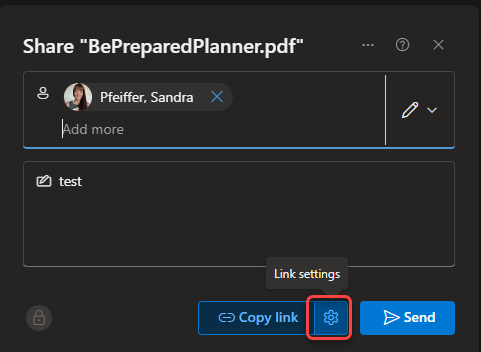
In this example, I’m going to share a file with Sandra, but I only want her to have access for a limited time. Once I enter her name, I click on the Cog icon for Link settings:
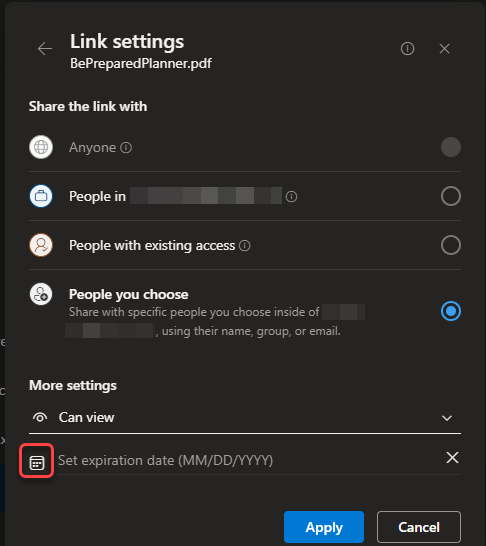
At the bottom of the Link settings panel, I have the option to set an expiration date for the sharing link. To set the date, I can click on the calendar icon and pick a date from the pop-up calendar:
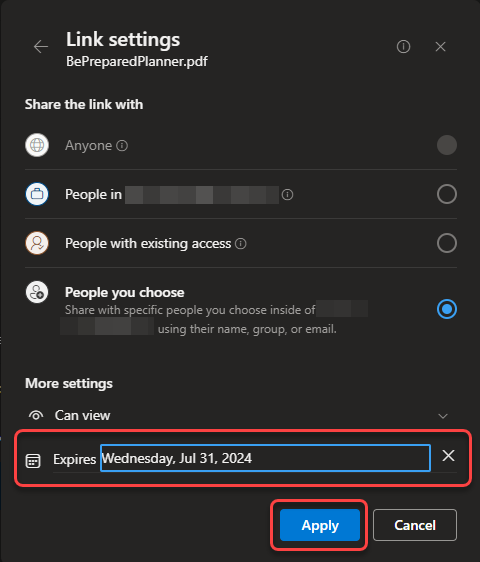
I selected July 31st, 2024, and here’s what it looks like. Once I click Apply, the link will be valid for Sandra until that date, and I won’t have to remember to go back and remove her permissions at a future time:

 One Minute Office Magic