Have you ever been part of a one-on-one or group chat in Teams, and there’s a particular message that you’d like to forward to another group/one-on-one chat/channel? Now you can with the Forward feature in the new Microsoft Teams. Here’s how that works…
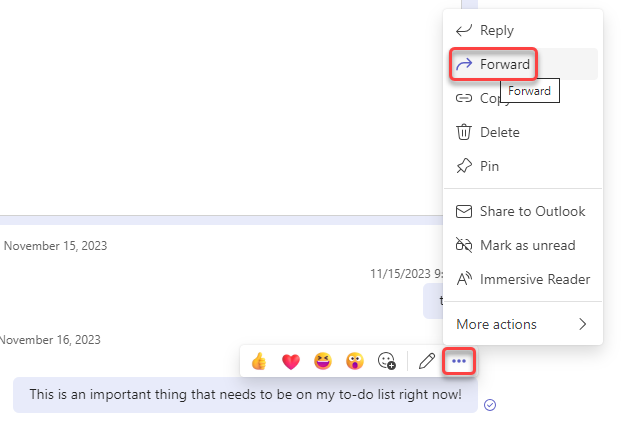
In this example, I want to forward this chat message to another group of people. To start that process, I click on the ellipsis for the chat message and select Forward:

I can forward it to a group chat (which is what I did here) or to one-on-one chats by entering the name of a specific person:
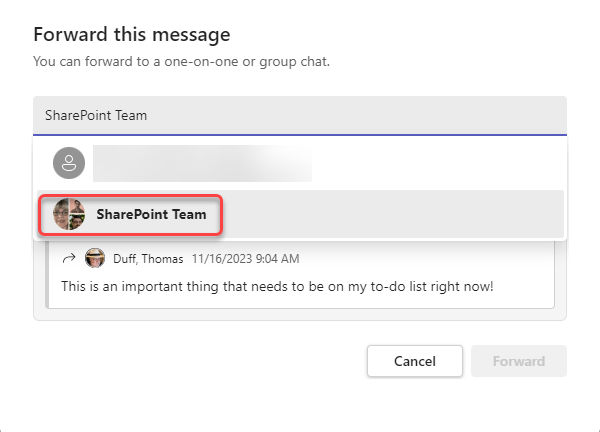
Once I’ve selected the person(s) to forward the message to, I can add some additional information to the forwarded message to provide additional information and/or context. Once I have that information in place, I click Forward:

When it gets to the destination chat, here’s what it looks like:
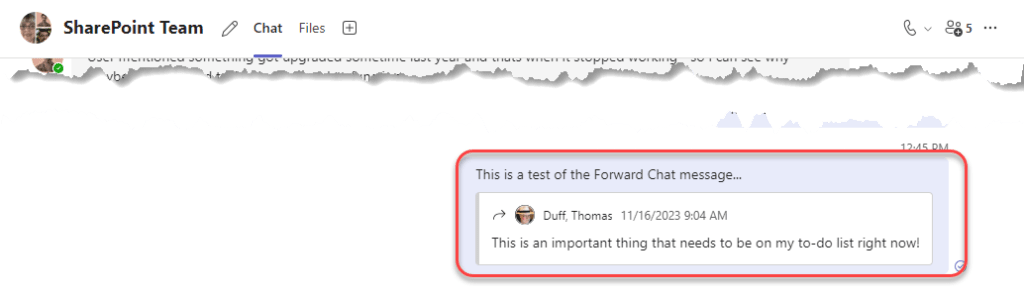
This is a great way to pass along important information to others who may not have seen the information in their own chats.

 One Minute Office Magic