
A colleague at work brought this to my attention, and it’s a cool OneNote feature. If you have a bulleted list of items with a title above the bullets, you can expand and collapse the bulleted section. Here’s how that works…
In this outline, I’ve created two bulleted lists, each with their own title. When I have both of the lists completed, I see a light grey arrow icon next to the title I hover over. Double-clicking on that grey icon collapses that bulleted list:
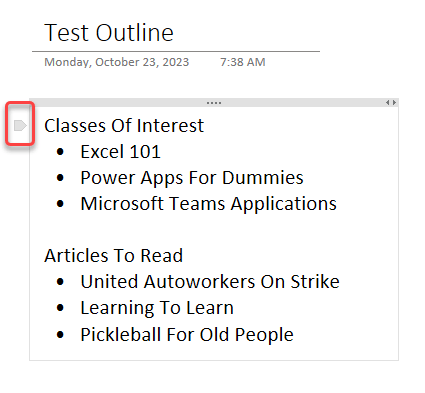
I can now see that I have a collapsed list because the icon has changed to a plus symbol. If I double-click on the plus symbol, the list will once again be expanded.
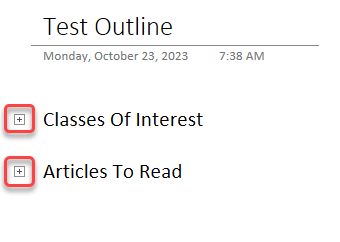
This is a great way to conserve space on a page, but still have all the data stored there. For more information, check out Create an outline to structure notes.

 One Minute Office Magic
What would be more useful is to allow me to collapse/expand *portions* of an outline. So, for example, suppose your first outline had items under “Excel 101.” I’d like to be able to collapse just that entry (“Excel 101” and its children), leaving the other items expanded.
LikeLike