Microsoft Teams has rolled out a new feature that will probably make some people smile, and others unhappy. I’m not sure which one I am yet. It’s the ability to have animated backgrounds when you use your video camera in a Teams meeting. Before you run off and grab your favorite Star Trek warp speed video background, read on for the restrictions and cautions…
To add video effects when you’re using your video camera, click on More > Video Effects:
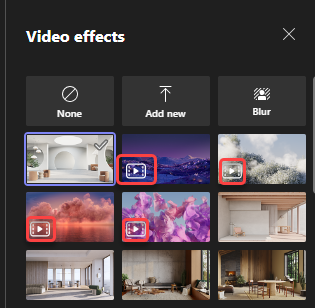
The Video effects panel will show you all the backgrounds you have available to use. You’ll notice four backgrounds that have a small video icon in the lower left corner. Those are the four pre-canned video backgrounds that Microsoft has provided:
I used this one for a demo. Granted, it’s not moving here as I didn’t want to load a video here. But in this one, the lights in the town twinkle, providing just a small bit of movement to capture your attention:
Here are the caveats:
- Only pre-defined backgrounds from Microsoft are provided. You currently cannot upload your own.
- Animated backgrounds are not available on low-end devices and require at least 8 GB RAM, CPU with 4 logical processors.
- Using more video filters might slow down background animation, in case of high machine workload.
Basically, there are some very narrow guardrails when it comes to using this feature.
Why am I not overly thrilled with this feature? If everyone has animated backgrounds going, it can make it hard to focus on the actual content of the meeting. The provided video backgrounds are pretty subtle and aren’t too bad. However, if/when Microsoft allows uploads of animated backgrounds, I know some people will go overboard with constant and dramatic movement… that will run continuously… during the entire meeting. Definitely a case of “just because you can, doesn’t mean you should…”

 One Minute Office Magic